
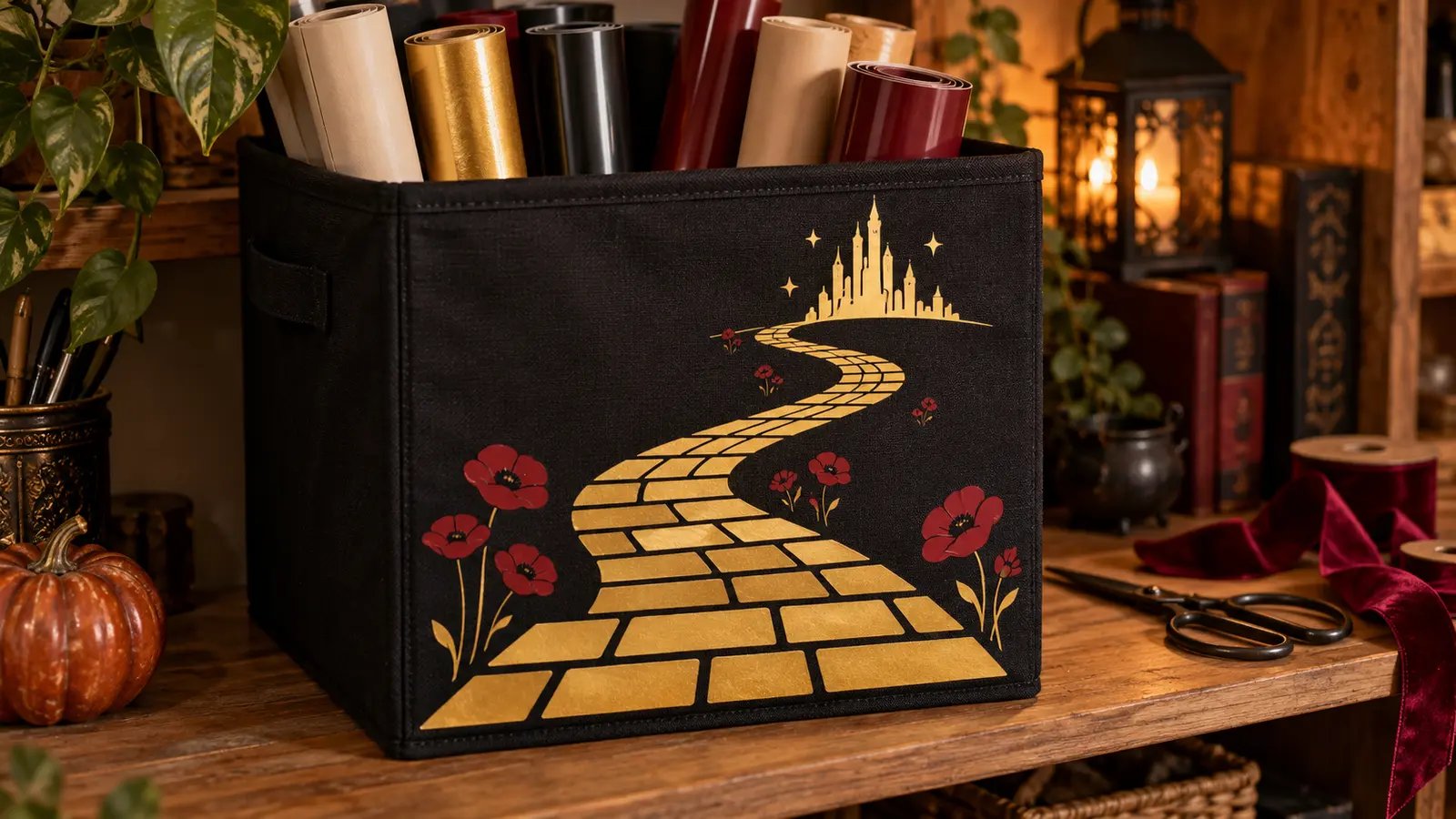
A collapsible fabric cube can hide vinyl scraps, cardstock, ribbon, and unfinished projects without making the craft room feel like a supply closet. This version turns one broad side panel into a winding-road landscape in cream, muted gold, and a small poppy-red accent. The artwork stays clear of handles, folds, seams, stiffeners, and the removable base so the bin still opens, closes, carries, and sits squarely on a shelf.
This is an original project plan based on common heat-transfer-vinyl methods for compatible fabric blanks. Storage-bin fiber content, coatings, dyes, padding, hidden stiffeners, adhesives, seam construction, HTV chemistry, press model, pressure, design scale, and care instructions can all change the result. Test the exact bin and vinyl, follow the current instructions for every bin, material, cutter, blade, mat, and heat tool, and edit only a duplicate working copy of the purchased artwork. The featured KleanKutChaos listing supplies the landscape artwork; the featured KleanKutChaos file is the design source for this tutorial. This tutorial does not claim that the pictured combination was physically tested with the listing files.
What you’ll need
- Wizard of Oz Yellow Brick Road SVG from the featured KleanKutChaos listing
- One sound collapsible cotton or cotton-canvas storage cube whose maker permits the required heat on a flat exterior panel
- The bin’s original removable base insert, removed before pressing and never decorated
- Heat-transfer vinyl approved for the bin fabric; use one finish or two to three colors specifically approved for layering
- Cricut-, Silhouette-, or similar cutting machine with the blade and mat specified for the selected HTV
- Cutting-machine software and a duplicate working copy of the purchased artwork
- Heat press, EasyPress-style tool, or iron permitted by both the bin and HTV makers
- Firm pressing mat or pad that fits entirely behind the flat artwork zone without crossing seams
- Protective paper or cover sheet only when required by the HTV or heat-tool instructions
- Heat-resistant tape approved for the transfer material
- Cardstock or plain paper for a full-size placement template
- Ruler, flexible tape measure, fabric-safe removable marker or tailor’s chalk, and painter’s tape
- Lint roller, weeding tool, tweezers, scissors, and bright task lighting
- Scrap fabric with similar fiber content for test cuts and heat tests
- Lightweight craft supplies for the finished bin; store blades, heat tools, liquids, chemicals, and heavy equipment elsewhere
How to make it
- 1
Choose a heat-compatible storage cube
Read the bin’s fiber-content, coating, care, weight, and assembly information. Select a smooth cotton or cotton-canvas cube with a removable base and a broad single-layer exterior panel. Reject vinyl-coated, laminated, waterproof, foam-backed, plastic-faced, unknown-fiber, or heavily padded bins unless every maker explicitly approves the required heat.
- 2
Inspect the structure before decorating
Open the cube exactly as directed and check every seam, handle, stiffener, hook-and-loop patch, label, corner, and fold. Do not use a bin with torn fabric, cracked inserts, exposed wire, loose stitching, distorted sides, or missing structural parts. Remove the base insert and any maker-approved removable accessories before planning the press area.
- 3
Prewash only when permitted
If the care label permits washing, prewash and dry the empty fabric shell exactly as directed, omitting fabric softener when the HTV maker requires it. Many collapsible bins are spot-clean only; never soak cardboard, fiberboard, adhesive-backed, or wire-supported construction. Let the blank become completely clean, dry, and room temperature.
- 4
Map the press-safe panel
Flatten the chosen side without forcing its folds. Measure handles, top binding, bottom channel, corner seams, internal dividers, and hidden stiffeners by touch and from the maker’s construction details. Reserve a generous no-press border around every structural feature, and confirm that the heat plate and pressing pad can fit inside the remaining flat zone.
- 5
Build a full-size paper mock-up
Print or sketch the landscape at final size and tape it temporarily to the assembled bin. Check the view from shelf height, then load the cube lightly to see where the side bows. Keep the road’s focal curve centered on the flattest area and move small details away from the bottom fold and corners before taking the bin apart again.
- 6
Simplify a duplicate artwork file
Keep the purchased file untouched and work from a copy. Isolate the winding road, distant skyline, and a few large poppy shapes. Remove detached specks, characters, narrow stems, and tiny architecture; thicken weak bridges and open cramped negative spaces so the design can be weeded and can flex with the fabric.
- 7
Plan the color separation
Assign cream to the main landscape, muted gold to the road, and reserve deep red for two or three broad poppy accents. Prefer non-overlapping inset pieces. If the selected HTVs permit layering, verify the allowed layer order, tack-press time, and maximum layers; otherwise leave a narrow fabric gap between colors.
- 8
Test cut and test press
Mirror the sample when required, place the HTV on the mat in the orientation specified by its maker, and cut the smallest skyline opening plus one narrow road edge. Weed the sample and press it onto comparable scrap fabric using the official time, temperature, pressure, cover, and peel instructions. Cool, flex, and spot-clean the sample before committing the bin.
- 9
Cut and weed the final layers
Mirror the final artwork when required and cut each color on its own carrier. Weed broad negative areas first, then hold delicate bridges against the carrier while lifting waste at a low angle. Compare each layer with the on-screen preview and recut any torn road edge, skyline opening, or poppy rather than patching fragments on the bin.
- 10
Create a seam-free pressing stack
Lay the empty fabric shell flat with the chosen exterior panel face up. Slide the approved pressing pad directly beneath the design so bindings, side seams, folds, labels, handles, and hidden supports hang outside the pad and heat-plate footprint. If the panel cannot lie fully flat, reduce the artwork or choose a different blank.
- 11
Align the first carrier
Lint-roll the panel, find its center with measured removable marks, and position the paper template first. Replace it with the cream carrier, confirm equal clearances from every seam, and secure only the carrier’s outside edge with approved heat-resistant tape. Do not stretch the bin fabric to make the design appear level.
- 12
Press the base landscape
Preheat only when the official material instructions call for it. Apply the first layer with the exact time, temperature, pressure, protective cover, and peel method specified for the tested HTV and fabric. Lift the tool straight up, keep the carrier still for the required cooling interval, and stop if the fabric shines, shrinks, puckers, discolors, or smells scorched.
- 13
Add the road and poppy accents
For approved layered HTV, use the maker’s stated short tack press for lower layers and final press for the last layer. For side-by-side pieces, align the road and poppies to the paper guide while protecting previously applied vinyl as directed. Never let bare vinyl, an exposed carrier edge, or a seam touch the heat plate.
- 14
Cool, cure, and reassemble
Let the shell cool completely flat, inspect every edge under bright light, and perform only a maker-approved finishing press if needed. Wait the full cure interval before folding, spot-cleaning, or loading the bin. Replace the base insert exactly as directed, square every corner, and use the finished cube only within its maker’s weight and care limits.
Practical finishing tips
- Keep the landscape low and wide so it reads across the slightly flexible face without touching the top binding or bottom fold.
- Side-by-side colors are safer than stacked layers when the HTV maker does not clearly approve layering.
- Press with the base insert removed; heat can warp board, melt coatings, soften adhesives, or trap moisture inside stiffeners.
- A paper mock-up on the assembled cube reveals bowing that is easy to miss while the fabric shell lies flat.
- Photograph the first carrier’s measurements before pressing so a damaged accent can be recut at exactly the same scale.
- Store the empty cured bin folded only on its original crease lines, with protective paper over the artwork if the HTV maker permits it.
Troubleshooting
Return the carrier to its original position and repress only according to the material’s official instructions. Verify the required peel temperature and pressure first; do not add unapproved heat to compensate for an incompatible or coated bin fabric.
Remove the insert, flatten the shell, and compare the design with the measured centerline rather than the flexible top edge. A small difference may disappear when the bin is evenly loaded; for a major error, remake the blank rather than stretching or trimming its structure.
Check whether the carrier was cut too deeply, then enlarge the artwork, open small windows, thicken bridges, or remove tiny towers from the duplicate file. Recut the complete affected layer rather than arranging loose fragments on fabric.
The pressing pad or heat plate is probably crossing a seam, fold, or hidden stiffener. Resize or split the design so every press lands on one truly flat zone; repeated heating over structural construction can damage the bin.
Let it relax flat without stretching, then compare the test result, heat setting, pressure, and fabric instructions. Do not keep pressing a distorted panel. Retire the bin if heat has warped its structure or changed how the base fits.
Ways to make it yours
Use only the winding road and skyline in cream HTV, enlarge the shapes, and omit small poppies for one cut, one weed, and one press cycle.
Add one broad word such as PAPER or VINYL below a simplified road only when the label remains inside the same flat press-safe zone and does not create a fourth HTV layer.
Make three separate compatible bins using the road, skyline, and poppies as different one-color focal motifs while keeping placement and scale consistent across the shelf.
Apply the design to a separate rigid sign insert and slide it into a commercially made clear label pocket when the bin fabric cannot safely take heat; never glue or stitch through hidden stiffeners.
Keep crafting
- DIY Witchy Yellow Brick Road Book Nook With Layered Cardstock — Build a moody storybook book nook with layered cardstock scenery, a winding gold road, and safely separated battery lighting.
- DIY Witchy Sewing Notions Box With Layered Cricut Vinyl — Turn a plain wooden box into a practical witchy sewing organizer with a carefully simplified portrait, layered vinyl accents, and removable interior dividers.
- DIY Witchy Pegboard Craft Tool Organizer With Removable Vinyl — Turn a plain pegboard into a flexible craft-tool station with removable witchy decals, clearly labeled zones, and a load plan that keeps sharp and heavy supplies secure.
Inspiration & further reading
This is an original Klean Kut Halloween Crafts project inspired by approachable techniques shared across trusted craft and home sources. Explore Cricut Everyday Iron-On instructions, Cricut heat-transfer blank preparation guidance, Cricut Heat Press recommended settings, Silhouette Smooth Heat Transfer material guidance and U.S. Consumer Product Safety Commission Art and Craft Safety Guide for more ideas and technique background.