
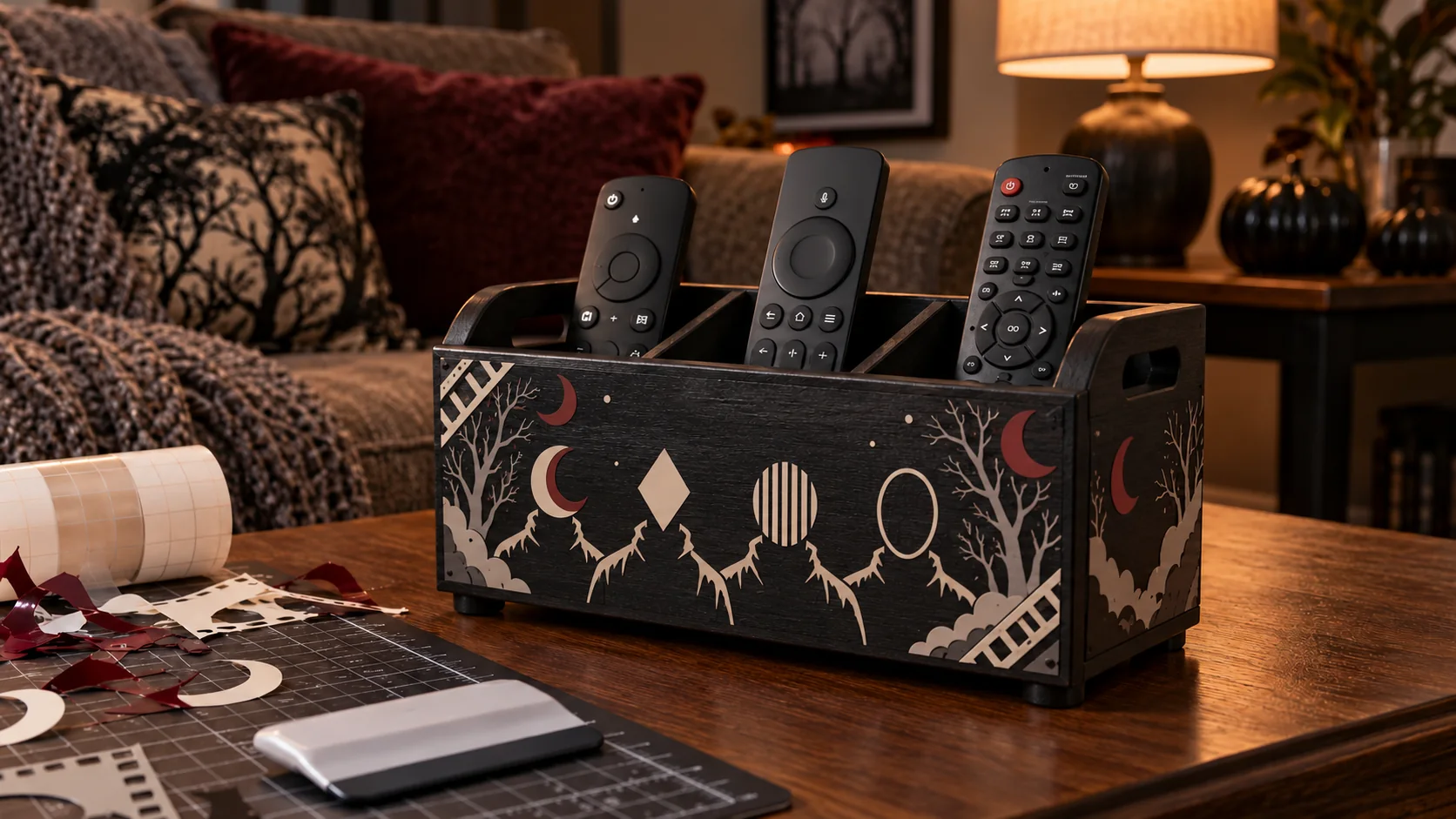
A divided remote caddy gives the living room a designated home for television, soundbar, and streaming-device controls without attaching vinyl to electronics. This project starts with a complete factory-made organizer that already sits flat and has smooth, accessible compartments. The horror artwork stays on the cool, sealed exterior faces: a simplified lineup of four ominous figures framed by restrained filmstrip, moon, branch, or fog accents. Handles, dividers, interiors, seams, feet, fasteners, and all device-contact surfaces remain bare.
This is an original project plan based on ordinary home-cutter and pressure-sensitive-vinyl methods. Caddy material, coating age, compartment depth, remote dimensions, cleaner, vinyl formula, transfer tape, blade, mat, room temperature, and artwork detail can all change the result. Follow the current directions for the exact organizer, electronics, cleaner, cutter, vinyl, and transfer tape you use, and test the real finish in a hidden area. The KleanKutChaos listing supplies the featured digital artwork only. The featured KleanKutChaos file is the design source for this tutorial, and this tutorial does not claim that the pictured combination was physically tested with the listing files.
What you’ll need
- 8 Horror Killer SVG Bundle with slasher-inspired character artwork from the featured KleanKutChaos listing
- One complete commercially made divided remote-control caddy with intact feet, rigid joints, smooth interior walls, and a stable factory-applied finish; choose compartments that fit the actual remotes without forcing them
- Two to four undamaged remote controls that remain fully functional, cool, dry, and within their device makers' care guidance; do not use a leaking, swollen, cracked, unusually hot, or recalled device
- Adhesive craft vinyl approved by its maker for the caddy's exact cool sealed finish, in one to three colors such as cream, muted burgundy, and smoky gray
- Transfer tape matched to the vinyl; use strong-grip tape only when the vinyl maker specifically requires it
- Cricut, Silhouette, or similar cutting machine with current software, a clean fine-point blade, and the mat specified for the vinyl
- Paper, pencil, ruler, flexible measuring tape, low-tack painter's tape, and full-size paper templates of the exterior front and side panels
- Weeding hook or tweezers, scraper or felt squeegee, small scissors, and scrap vinyl for test cuts
- Low-lint cloths and only the mild cleaner approved by both the caddy and vinyl makers; never mix cleaners or soak wood, seams, feet, or hardware
- A stable dry worktable with bright task lighting, plus safety glasses and any protective equipment required by the tool and material makers
How to make it
- 1
Choose a stable finished caddy
Use a factory-made organizer that sits flat on every foot, has rigid dividers and smooth compartments, and has no cracks, splinters, loose fasteners, sharp edges, wobble, or peeling finish. Confirm that the broad exterior panel is sealed and suitable for pressure-sensitive vinyl. Reject unfinished, warped, folding, improvised, or mystery materials.
- 2
Inventory the actual remotes
Inspect each remote before measuring it. Battery doors must latch, cases must be intact, and buttons, microphones, infrared windows, charging ports, solar panels, vents, and maker labels must remain visible and accessible. Remove any remote that is hot, leaking, swollen, damaged, recalled, or behaving abnormally, and follow its maker's safety or disposal guidance.
- 3
Dry-fit for access and stability
Place the empty caddy on its intended low, level, dry table and insert the remotes upright without packing them tightly. Confirm that the caddy does not tip when the tallest remote is removed, each control can be grasped without pinching fingers, and no button is pressed by a divider. Choose a larger or lower organizer if the fit is unstable or crowded.
- 4
Map every no-vinyl zone
Trace the front and side faces at full size. Mark all handles, handholds, compartment openings, interior walls, divider edges, feet, seams, joints, fasteners, maker labels, unfinished surfaces, and device-contact areas as off-limits. Add the larger of a half-inch buffer or the clearance required by either maker so decal edges cannot enter a joint or snag a hand.
- 5
Test the finish discreetly
With the caddy empty, clean a hidden sealed spot by its maker's method and let it dry. Apply small samples of the selected vinyl and transfer tape, then inspect or remove them after the makers' stated interval. Stop if the finish lifts, clouds, stains, softens, absorbs cleaner, releases pigment, or needs aggressive burnishing.
- 6
Clean only the exterior art panels
Move every remote and battery-powered item off the worktable. Wipe only the flat exterior faces with the approved cleaner on a barely damp low-lint cloth. Keep all liquid out of compartments, seams, feet, raw edges, and hardware, then let the caddy become completely dry and room temperature.
- 7
Build a full-size paper layout
Make paper versions of three or four simplified shoulder silhouettes plus a few filmstrip, moon, branch, star, or fog accents. Arrange them within the safe outline, leaving calm space around both handles and every edge. Set the paper mockup against the caddy, then load and remove each remote to verify that hands never rub the planned art.
- 8
Prepare a sturdy working copy
Duplicate the purchased artwork and preserve the original files. Choose only the figures needed for a readable lineup, then simplify isolated specks, narrow weapon details, and hairline openings that fall below the vinyl maker's minimum recommendation. For a less literal result, replace facial details with original geometric mask shapes or solid shadows.
- 9
Plan layers without bulk
Limit the palette to one, two, or three compatible vinyl colors. Favor adjacent pieces and knockout openings instead of stacking full silhouettes, which creates thick edges on a handled object. Divide the design into one manageable front-panel group and smaller side accents, adding temporary registration marks only if the chosen workflow needs them.
- 10
Run a material test cut
Place a scrap on the specified mat, select the closest manufacturer setting, and cut one face opening plus a narrow filmstrip segment. Confirm that the blade cuts the vinyl cleanly without slicing the liner. Adjust one setting at a time and replace a worn blade or damaged mat instead of forcing extra pressure.
- 11
Cut, weed, and compare
Cut each color, then weed from the outside inward while the liner remains flat. Remove the intended openings and secure every tiny scrap where children and pets cannot reach it. Compare the weeded silhouettes with the software preview and paper mockup so an accidentally missing eye, stripe, or background piece does not change the design.
- 12
Apply matched transfer tape
Attach the transfer tape from the center or one end and burnish outward according to its maker. Flip and burnish the liner side, then trim the tape into manageable rectangles without clipping the vinyl. Use lower-tack matched tape for fine branches and fog shapes unless the vinyl instructions say otherwise.
- 13
Hinge and transfer the lineup
Keep the caddy empty and brace it on the stable worktable without clamping or stressing its joints. Align the main lineup with the paper template and secure one edge with a low-tack tape hinge outside the motif. Peel the liner at a low angle, lower the design gradually, and burnish from the center outward. Peel transfer tape back over itself rather than lifting it straight up.
- 14
Add restrained side accents
Apply the filmstrip, moons, trees, or fog to the verified exterior zones one piece at a time. Preserve every marked clearance and keep the handles easy to grasp. Do not bridge a seam, wrap vinyl around an edge, cover hardware, or continue a decal into a compartment.
- 15
Let the caddy cure empty
Leave the organizer empty, clean, dry, and undisturbed for the vinyl maker's full cure interval. Keep it away from children, pets, direct sun, heaters, and traffic. Never speed curing with a heat gun, hair dryer, iron, heated press, oven, or open flame.
- 16
Inspect the finished organizer
After cure, run a clean fingertip lightly along each decal edge and inspect every handle, joint, seam, foot, divider, and compartment from multiple angles. Remove and recut any motif that curls, narrows a grip, reaches an interior surface, or interferes with stable placement. Do not seal the vinyl with an unapproved coating.
- 17
Reload and perform a final use test
Return the caddy to its dry level location and insert the cool, intact remotes one at a time. Remove and replace each control several times, confirm the organizer stays planted, and verify that no buttons are held down and no electronic surface touches vinyl. Keep drinks, chargers, loose batteries, and heat sources away from the finished station.
Practical finishing tips
- Use three large simplified figures instead of all eight designs when the front panel is narrow; readable negative space is more effective than a crowded lineup.
- Photograph the undecorated caddy with every remote in place so you can preserve the easiest grab order after curing.
- Keep the tallest control near the center when the caddy maker allows it, reducing leverage that can tip a lightweight organizer.
- Rounded mask openings and thicker shoulder contours weed more reliably than tiny eyes, teeth, hair strands, or weapon details.
- Cut the side motifs separately so transfer tape never crosses a handle, seam, corner, or divider opening.
- Dust cured vinyl with a dry soft cloth; remove remotes first and never spray cleaner toward compartments or electronics.
Troubleshooting
Lay the transfer tape back down, burnish the liner side, and peel the liner away at a lower angle. If the hidden-area test also failed, switch to a compatible vinyl-and-tape combination instead of scraping harder against the caddy.
Stop immediately and remove the remaining tape without enlarging the damaged area. The coating may be fragile, uncured, or incompatible. Do not hide damage under more vinyl; follow the caddy maker's repair guidance or use a separate removable cardstock decoration that cannot enter the compartments.
Remove the smallest accents and recut a working copy with fewer figures, thicker negative spaces, and one restrained border. Do not shrink details below the vinyl maker's recommendation just to fit all eight designs.
Keep the caddy empty and remove the interfering piece. Enlarge the no-vinyl buffer in the layout and recut that motif. Never trim adhesive vinyl in place near a seam, handhold, or device-contact surface.
Remove it immediately and inspect the fit. A divider or neighboring control may be pressing a button. Reassign the compartment or use a larger caddy; do not alter the remote, wedge it with scrap material, or force it deeper.
Remove every remote and inspect the feet, surface, joints, and weight distribution. Move it to a lower level location and reduce the load only if the caddy maker permits it. Replace rather than improvise a repair for damaged feet or structure.
Ways to make it yours
Cut three solid cream shoulder silhouettes with knockout mask shapes for faster weeding and a graphic black-and-ivory finish.
Use only the simplest character silhouettes and place small filmstrip corners inside the verified safe zone for an old-cinema look without covering the whole front panel.
Mount the cut vinyl on a separate thin cardstock or maker-approved insert displayed against the exterior when the caddy finish cannot accept adhesive, securing it only by a non-damaging method that cannot enter the compartments or block a handle.
Use the same exterior-only decoration on a complete factory-made open bin for unplugged controller accessories, but keep controllers, batteries, cables, charging equipment, ports, vents, and device-contact surfaces completely free of vinyl.
Keep crafting
- DIY Horror Killer Lineup Table Runner With Heat-Transfer Vinyl — Turn a plain cotton runner into a dramatic Halloween centerpiece with eight coordinated horror silhouettes, careful spacing, and matte black heat-transfer vinyl.
- DIY Horror Movie Ticket Stub Accordion Album With Cricut or Silhouette — Build a sturdy accordion album that turns horror-movie ticket stubs into a dramatic shelf display with fitted pockets and a vinyl-decorated cover.
- DIY Hooded Slasher Coir Doormat With a Cutting-Machine Stencil — Turn a plain coir mat into a sharp black-and-tan Halloween welcome piece with a hooded slasher stencil, optional block lettering, and outdoor-rated paint.
Inspiration & further reading
This is an original Klean Kut Halloween Crafts project inspired by approachable techniques shared across trusted craft and home sources. Explore Cricut Vinyl instructions, Cricut Transfer Tape Instructions and U.S. Consumer Product Safety Commission Art and Craft Safety Guide for more ideas and technique background.