
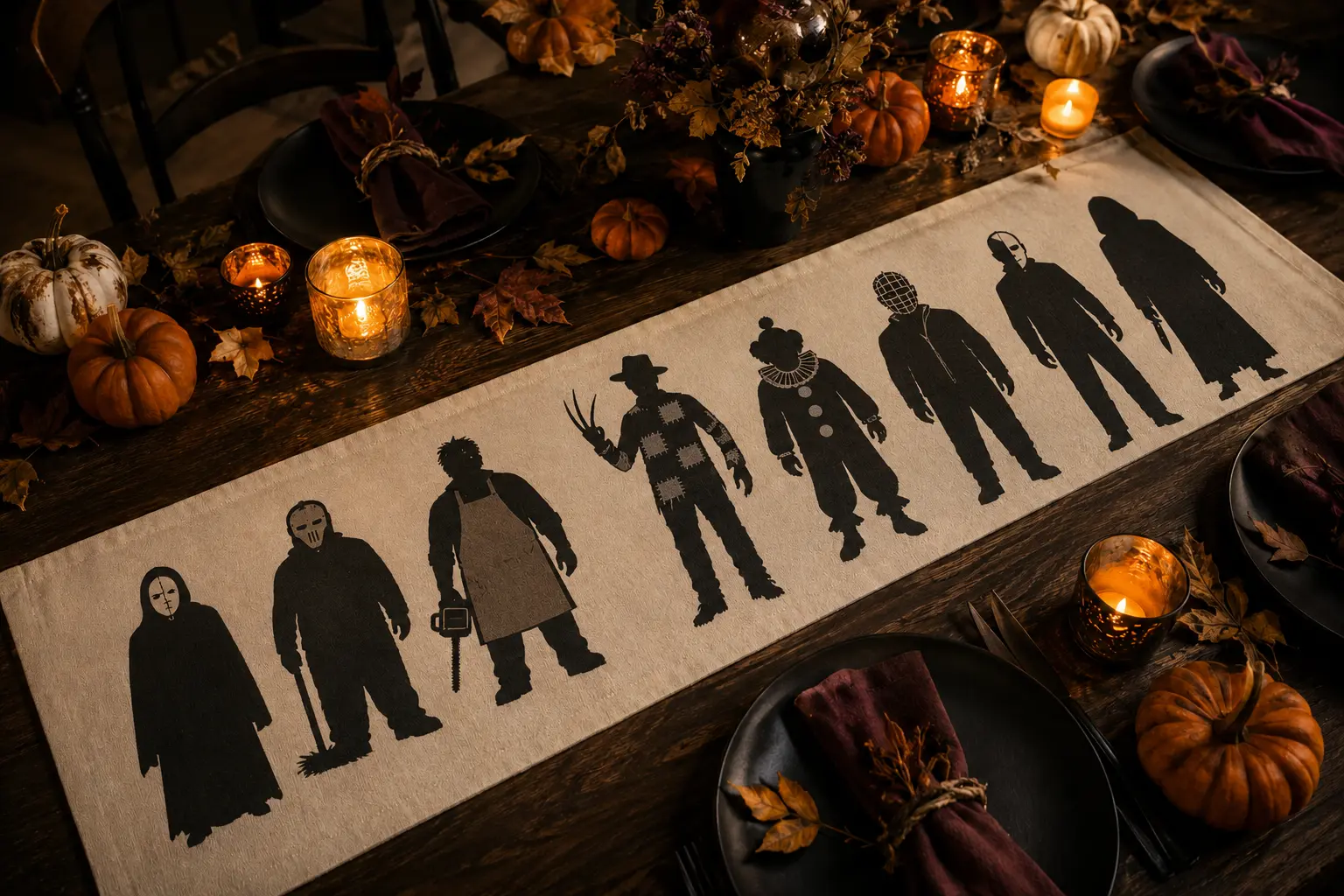
A long table runner gives a multi-design bundle room to breathe. Instead of squeezing eight characters onto one shirt, this project spaces the silhouettes like a cinematic lineup so every outline stays readable from across the table. Matte black heat-transfer vinyl keeps the palette restrained, while the repeated height and baseline make eight different designs feel like one intentional collection.
This is an original project plan based on common heat-transfer-vinyl methods and the manufacturer-guided approach of testing, mirroring, pressing, and peeling according to the exact fabric and vinyl in use. Cotton content, coatings, seams, heat tools, pressure, and HTV formulas vary, so treat the measurements here as layout guidance and use the time, temperature, pressure, and peel instructions supplied with your chosen materials.
What you’ll need
- Prewashed, uncoated cotton or cotton-rich canvas table runner, roughly 14 by 72 inches
- Eight-design Horror Killer SVG bundle from the featured KleanKutChaos listing
- Matte black heat-transfer vinyl from one product line and finish
- Cutting machine, clean cutting mat, blade recommended for the HTV, and scraper
- Weeding tool, fine tweezers, and a bright work light
- Heat press or household iron approved for the chosen HTV
- Firm heat-resistant pressing mat or surface recommended by the heat-tool maker
- Protective cover sheet or parchment only when allowed by the HTV instructions
- Measuring tape, quilting ruler, washable fabric chalk, and painter’s tape
- Plain paper for full-size character templates and spacing tests
- Lint roller and the care instructions for both the runner and heat-transfer vinyl
How to make it
- 1
Choose and prewash the runner
Select a flat runner without waterproofing, heavy texture, loose fringe near the design area, or thick seams through the center. Wash and dry it as the fabric label directs without fabric softener, then press out wrinkles using a temperature safe for the blank. Do not decorate until the runner is clean, dry, and flat.
- 2
Measure the usable design lane
Lay the runner on the table where it will be used. Mark a safe central lane that stays at least one inch from side hems and several inches from the short ends. Measure around any seam, embroidery, or fold that could prevent even pressure. Record the usable length instead of assuming the package dimensions are exact.
- 3
Unify the eight silhouettes
Import the bundle and size the characters to a shared visual height, usually about five to seven inches on a 14-inch-wide runner. Adjust for hats or tall weapons so the bodies—not just the bounding boxes—feel consistent. Simplify or omit hairline details that become fragile at the final size, but preserve each main silhouette.
- 4
Build a full-size paper lineup
Print or cut paper versions and arrange them down the runner before touching HTV. Start with the two strongest silhouettes near the center and work outward, alternating wide and narrow poses. Leave a consistent gap of roughly two to three inches, then photograph the finished layout and note every character’s distance from the runner centerline.
- 5
Test the complete material stack
Cut a small, expendable shape from the same HTV and apply it to a hidden runner corner or matching fabric scrap. Follow the vinyl maker’s current heat instructions exactly. Confirm that the fabric tolerates the temperature, the vinyl bonds after the specified peel, and the surface does not scorch, shine, shrink, or distort.
- 6
Mirror, cut, and weed in labeled batches
Mirror every design before cutting heat-transfer vinyl and place the carrier side in the orientation specified by its manufacturer. Cut two or three silhouettes per batch so the long sheet stays manageable. Weed slowly from large spaces toward faces, masks, and weapons, then number each carrier sheet to match the paper-layout photograph.
- 7
Mark the center and pressing zones
Fold the runner lightly lengthwise and crosswise or use washable fabric chalk to identify the center without creating a permanent crease. Rebuild the paper layout and place short painter’s-tape guides outside each carrier area. Remove all paper before applying heat, but leave enough safe guides to keep the baseline straight.
- 8
Press from the center outward
Prepress only the first zone if the material instructions call for it. Position the center silhouette, cover it as directed, and apply the exact time, temperature, and pressure required. Peel hot, warm, or cold only as specified. Continue outward one design at a time, supporting the runner so finished sections do not drag or wrinkle.
- 9
Avoid accidental double pressing
Keep previously applied vinyl and exposed carrier sheets outside the active platen or iron path whenever possible. If a small overlap cannot be avoided, protect finished vinyl with the cover material approved by its maker and use only the additional heat the instructions permit. Never place a hot soleplate directly on exposed vinyl.
- 10
Inspect, rest, and style safely
After the final peel, inspect every narrow edge at room temperature. Repress a lifting section only if the HTV instructions recommend it. Remove washable alignment marks, then let the adhesive rest for the required period before laundering or folding. Style with cool battery-operated candles and keep hot serving dishes on proper trivets rather than directly over the decorated fabric.
Practical finishing tips
- Number the back of each carrier sheet and its matching paper template so eight similar black silhouettes never get reordered by accident.
- Use the same HTV brand, color, and finish across the runner; small differences in black and sheen become obvious under dining-room light.
- Judge spacing from six feet away before cutting. The lineup should read as a rhythm of dark shapes, not one crowded block.
- Place the most detailed characters toward the center, where guests can see them, and simpler silhouettes near the runner ends.
- If the finished runner may be sold, confirm that the bundle and any added lettering include the commercial rights required for that use.
Troubleshooting
Stop pulling the carrier. Return it to position and check the maker’s required peel temperature, pressure, and pressing surface. Repress only for the additional time recommended for that HTV; more heat is not automatically better.
The heat may be too high, the press too long, or the cover material unsuitable. Stop and retest on scrap at the manufacturer’s approved settings. A damaged blank cannot be fully restored, so never proceed through all eight designs after the first warning sign.
Pause and rebuild the remaining paper layout from the centerline. Use the photographed measurements rather than aligning each new character only to the previous one, which compounds small errors.
The design is too small for the material or cut setting. Enlarge that character, simplify nonessential interior cuts, or choose a bolder design from the bundle instead of forcing fragile pieces back onto the carrier.
Let the fabric cool flat after each press and support its full length. If the blank has stretched or shrunk, stop pressing, allow it to relax, and reassess the remaining spacing before continuing.
Ways to make it yours
Use matte black HTV on a washed black canvas runner for a subtle lineup that appears when candlelight catches the different finishes.
Use only five larger silhouettes in the middle third of a short runner, leaving both ends plain for serving pieces.
Place one different silhouette on each prewashed placemat, keeping every design the same visual height and distance from the lower edge.
Cut the characters from heavyweight black cardstock and mount them on separate pennants when heat-transfer vinyl is not appropriate for the fabric you own.
Keep crafting
- DIY Slasher Silhouette Luminary Village — Build a row of glowing paper luminaries with a different horror silhouette hidden in every window.
- DIY Hooded Slasher Coir Doormat With a Cutting-Machine Stencil — Turn a plain coir mat into a sharp black-and-tan Halloween welcome piece with a hooded slasher stencil, optional block lettering, and outdoor-rated paint.
- DIY Horror Clown Movie-Night Party Kit — Make a coordinated horror movie-night set with snack boxes, drink decals, table cards, and a bold feature sign.
Inspiration & further reading
This is an original Klean Kut Halloween Crafts project inspired by approachable techniques shared across trusted craft and home sources. Explore Cricut’s custom baby-clothes heat-transfer guide, Cricut’s material-selection guide and Cricut Heat Guide for more ideas and technique background.