
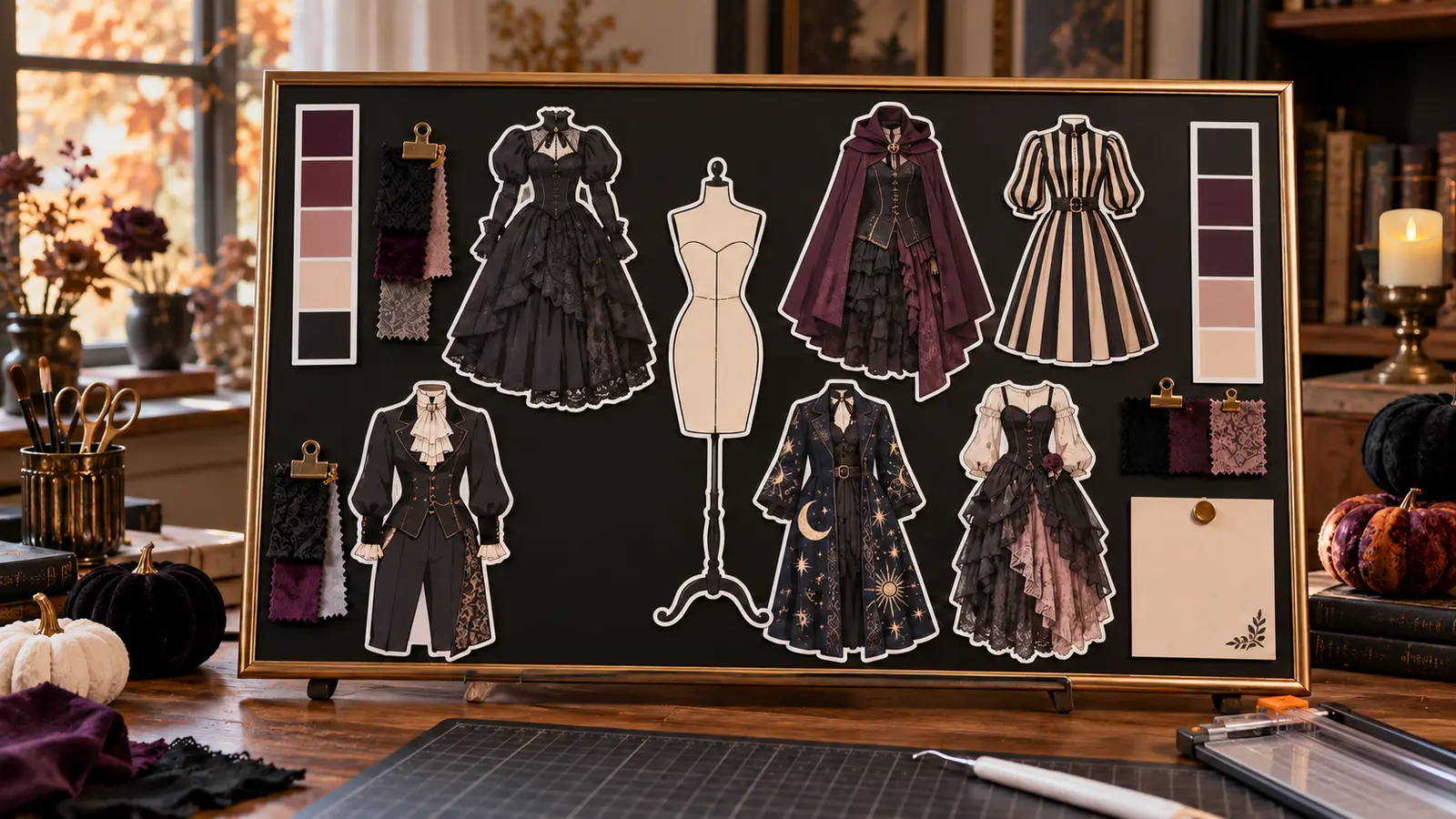
Costume ideas are easier to compare when every full look, color family, and fabric sample can move around on one board. This planner turns six complete gothic fashion illustrations into large decorative magnets rather than pretending the files are interchangeable paper-doll separates. A simple dress-form silhouette anchors the composition, broad palette strips keep colors consistent, and a removable note card holds measurements or shopping reminders. When the costume is finished, the same board becomes seasonal craft-room art.
This is an original project plan based on ordinary Print Then Cut and decorative printable-magnet methods. Printer feed path, ink type, magnet-sheet coating, sheet thickness, cutter model, sensor, blade, mat, lighting, artwork scale, board metal, frame, adhesive, room humidity, and drying time can all change the result. Use only materials explicitly approved by their printer and cutting-machine makers, run complete paper and magnet-sheet tests, and edit only a duplicate working copy of the purchased artwork. The KleanKutChaos listing supplies the featured outfit artwork; the featured KleanKutChaos file is the design source for this tutorial. This tutorial does not claim that the pictured combination was physically tested with the listing files.
What you’ll need
- Gothic Paper Doll Fashion SVG Bundle from the featured KleanKutChaos listing
- One 12-by-16-inch or larger steel magnetic memo board; confirm a sample sheet magnet actually holds before decorating
- Purpose-made tabletop board stand or wall hardware rated for the complete board and frame weight
- Slim frame or edge trim that leaves the magnetic face accessible; use only if approved for the board
- Inkjet-printable magnet sheets explicitly compatible with both the exact inkjet printer and Print Then Cut machine; do not use in a laser printer
- Ordinary white copy paper for calibration and draft prints
- Cricut-, Silhouette-, or similar Print Then Cut-compatible machine with current software, fine-point blade, and the mat specified by the magnet-sheet maker
- Home inkjet printer with adequate ink and a straight or supported feed path approved for the chosen sheet thickness
- Brayer, scraper, weeding tool, paper trimmer, ruler, pencil, and low-tack painter's tape
- One broad magnetic note-card pocket or a large printable magnetic note panel
- Optional fabric swatches at least 2 by 3 inches and large enclosed magnetic clips designed for memo boards; avoid loose high-powered magnets
- Plain dress-form silhouette created from basic software shapes, plus color-swatch rectangles
- Matte black paper or removable matte board film if the memo board face needs a darker background
- Lint-free cloth and the board maker's approved cleaner
- Safety glasses and any protective equipment required by the printer, cutter, frame, or adhesive makers
How to make it
- 1
Choose a real magnetic work surface
Test the board with a corner of the printable magnet sheet before buying the rest of the materials. Some decorative metal, aluminum, stainless steel, coated hardboard, and magnetic-look boards do not hold weak sheet magnets well. Select a flat steel memo board whose maker permits decorative magnets, and reject any frame with sharp edges, cracked glass, loose backing, or unstable hardware.
- 2
Decide how the board will stand
For a tabletop planner, use a purpose-made easel or stand rated above the complete board weight and deep enough to resist tipping. For a wall board, use the manufacturer's specified anchors in a suitable wall structure. Do not prop a heavy framed board against a wall where it can slide, and keep it out of walkways, food-preparation zones, and children's reach.
- 3
Measure the usable magnetic face
Record the visible width and height inside the frame, then draw that exact rectangle on paper. Reserve a two-inch perimeter for easy finger access and keep magnets away from any raised trim. Mark a central zone for the dress form, six surrounding outfit positions, two vertical palette strips, and one lower corner for notes.
- 4
Mock up the full composition on paper
Print low-ink draft thumbnails of the six purchased outfit illustrations and cut rough rectangles around them. Arrange the drafts on the paper board map with the dress-form placeholder, palette strips, and note card. Check that every look can move without covering another and that the whole outfit remains readable from several feet away.
- 5
Prepare duplicate artwork files
Open copies of the purchased files and keep each outfit as one complete illustration. Remove only isolated artifacts that would create fragile outer cuts, preserve intentional interior detail, and do not split garments into mix-and-match parts unless the listing actually provides them that way. This planner compares full looks; it does not need to imply articulation the source art does not have.
- 6
Build a sturdy white offset
Create a smooth white border around each outfit so fine sleeves, lace, and hems join one continuous magnetic piece. Round acute points that could bend, and size every finished look at least three inches in its smallest practical dimension. Avoid tiny detached stars, buttons, labels, or accessories that could become loose magnetic parts.
- 7
Create the planning extras
Use basic shapes to make one neutral dress-form silhouette, two broad color-palette strips, and a large blank note panel. These elements should be original and visually quieter than the featured outfits. Add no tiny type; handwritten notes on a replaceable paper card are easier to read and update than miniature printed labels.
- 8
Flatten and size the printable layout
Convert each finished outfit group into a single Print Then Cut image while preserving resolution. Place the pieces within the software's current printable-area guide, leave space between offsets, and confirm the final dimensions numerically. Print Then Cut is normally printed in reading orientation, not mirrored; follow the current instructions for the exact material and machine.
- 9
Calibrate on copy paper
Run the machine maker's current Print Then Cut calibration using the specified plain paper, printer settings, fine-point tool, and sensor-mark orientation. Then print one outfit on copy paper and cut it. If the border is uneven, recalibrate and correct the software or printer settings before using a magnet sheet.
- 10
Confirm the entire material path
Read the printer and magnet-sheet instructions together. Verify inkjet compatibility, maximum thickness, printable side, feed direction, and whether sheets must be loaded one at a time. Never put inkjet-only magnet material through a laser printer, and do not force a sheet into a printer or cutter that excludes its thickness.
- 11
Print one magnet sheet at a time
Remove other paper from the tray, load a single magnet sheet in the tested orientation, and print at the approved quality setting without scaling, borderless enlargement, or fit-to-page changes. Keep the sensor marks clean and matte. Set the sheet flat in a dust-free area for the full ink-drying interval before touching the printed face.
- 12
Test-cut a palette strip first
Place the dry sheet on the specified mat in the same orientation shown in the software and smooth it with a brayer. Select the exact printable-magnet material setting when available. Cut a simple broad palette strip first, then unload and check whether the blade cut the magnetic layer cleanly without gouging the mat, dragging ink, or shifting the sheet.
- 13
Cut the outfit magnets
Once the test succeeds, cut the outfit sheets one at a time. Watch the first sensor scan without moving the mat or casting a shadow over the registration area. If the machine cannot read the marks, stop and troubleshoot lighting, material reflectivity, print quality, and calibration rather than drawing over marks or repeatedly forcing the cut.
- 14
Remove and inspect every piece
Turn the mat face down and peel the mat away from the magnet sheet slowly so the large pieces stay flat. Check every edge for loose slivers, sharp corners, delamination, wet ink, or tiny cutouts. Discard or recut damaged pieces; do not glue a high-powered magnet onto the back to rescue a weak or warped sheet magnet.
- 15
Finish the board accessories
Place the broad dress form, palette strips, and note panel according to the paper map. If using fabric samples, clip large swatches into enclosed memo-board clips that the clip maker approves, then keep the clips at least three inches across or otherwise outside the reach of children and pets. Never use loose magnetic balls, cubes, discs, or tiny craft magnets.
- 16
Arrange, photograph, and inspect
Wipe the board with its approved cleaner, let it dry, and place the six outfit magnets with breathing room around the dress form. Confirm that every piece holds when the board is gently nudged and that the stand or anchors remain stable. Photograph the arrangement for shopping reference, then store unused magnets flat in a labeled envelope high out of reach.
Practical finishing tips
- Keep full outfit silhouettes intact. Large unified magnets are easier to handle, safer to store, and more faithful to artwork that was not designed as separate doll clothing.
- Use a consistent white offset so black garments remain visible against a matte-black board.
- Print the paper mockup in economy mode and reserve high-quality ink for the final magnet sheets.
- Photograph each board arrangement before moving pieces; the image becomes a portable shopping list for fabric and accessories.
- If fabric swatches make the board feel crowded, keep them in a small envelope beside the planner and display only the two finalists.
- Store magnets completely flat. Rolled or bent printable magnet sheets may lift at the edges and feed poorly later.
Troubleshooting
Stop instead of pushing or taping the sheet to carrier paper. Recheck the printer's supported media thickness, feed path, printable side, and one-sheet loading instructions. Use a different compatible printer or the magnet maker's approved method if the sheet is outside the printer specification.
Return to copy paper, perform the current Print Then Cut calibration, verify 100-percent print scale, clean the sensor area as the machine maker directs, and print a fresh test. Matte white material and clean sensor marks generally scan more reliably than dark, glossy, metallic, or laminated surfaces.
Check for glare, shadows, low ink, reflective laminate, incorrect sheet color, or a mat loaded in the wrong orientation. Use only compatible matte material and the maker's recommended lighting and print settings. Do not trace over the registration marks or cut by guesswork.
Confirm the sheet is on its printable side and that the ink and material are compatible. Handle only the margins, extend the drying time, and avoid stacking sheets. Reprint on a fresh sheet if the image remains tacky; sealing with an unapproved glossy coating can interfere with sensor reading and flexibility.
Verify that the board is ferromagnetic steel, clean both surfaces, flatten warped pieces, and reduce the size or weight of attached fabric. Printable sheet magnets are decorative and may not hold extra papers. Replace the board or display the pieces flat rather than adding stronger loose magnets.
Increase the offset, round vulnerable points, and enlarge the illustration. Store each magnet flat on a steel sheet or smooth backing card. Do not crease, roll, or stack heavy tools on top of detailed silhouettes.
Ways to make it yours
Use one full outfit in each of six palette families—black, plum, cream, rose, charcoal, and celestial blue—then keep fabric swatches in a separate envelope.
Scale the concept to an 8-by-10-inch steel board with three large full-look magnets, preserving the three-inch minimum size and all material-compatibility tests.
Print the outfit art on heavyweight cardstock, mount each full look to a broad backing card, and use an adult craft-room corkboard with ordinary clips instead of magnets.
Replace the decorative dress form with large printable magnets for boots, wig, cape, repair kit, and garment bag so the board becomes a visual packing checklist without tiny labels.
Keep crafting
- DIY Gothic Costume Emergency Kit Tin With Cricut Vinyl — Turn a smooth hard-shell tin into a compact gothic costume emergency kit with a simplified portrait decal and safely organized repair supplies.
- DIY Gothic Halloween Costume Garment Bag With Cricut HTV — Personalize a fabric garment bag with a dramatic gothic cut file, a press-safe layout, and practical details that protect Halloween costumes between events.
- DIY Gothic Halloween Director’s Chair Back With Cricut HTV — Make a removable director’s-chair back with a carefully simplified gothic HTV design, press-safe seam clearance, and a fit check that protects the chair’s structure.
Inspiration & further reading
This is an original Klean Kut Halloween Crafts project inspired by approachable techniques shared across trusted craft and home sources. Explore Cricut Printable Magnet Sheets instructions, Cricut Print Then Cut calibration instructions, Cricut Print Then Cut compatible-material guidance, U.S. Consumer Product Safety Commission magnet-safety guidance and U.S. Consumer Product Safety Commission Art and Craft Safety Guide for more ideas and technique background.