
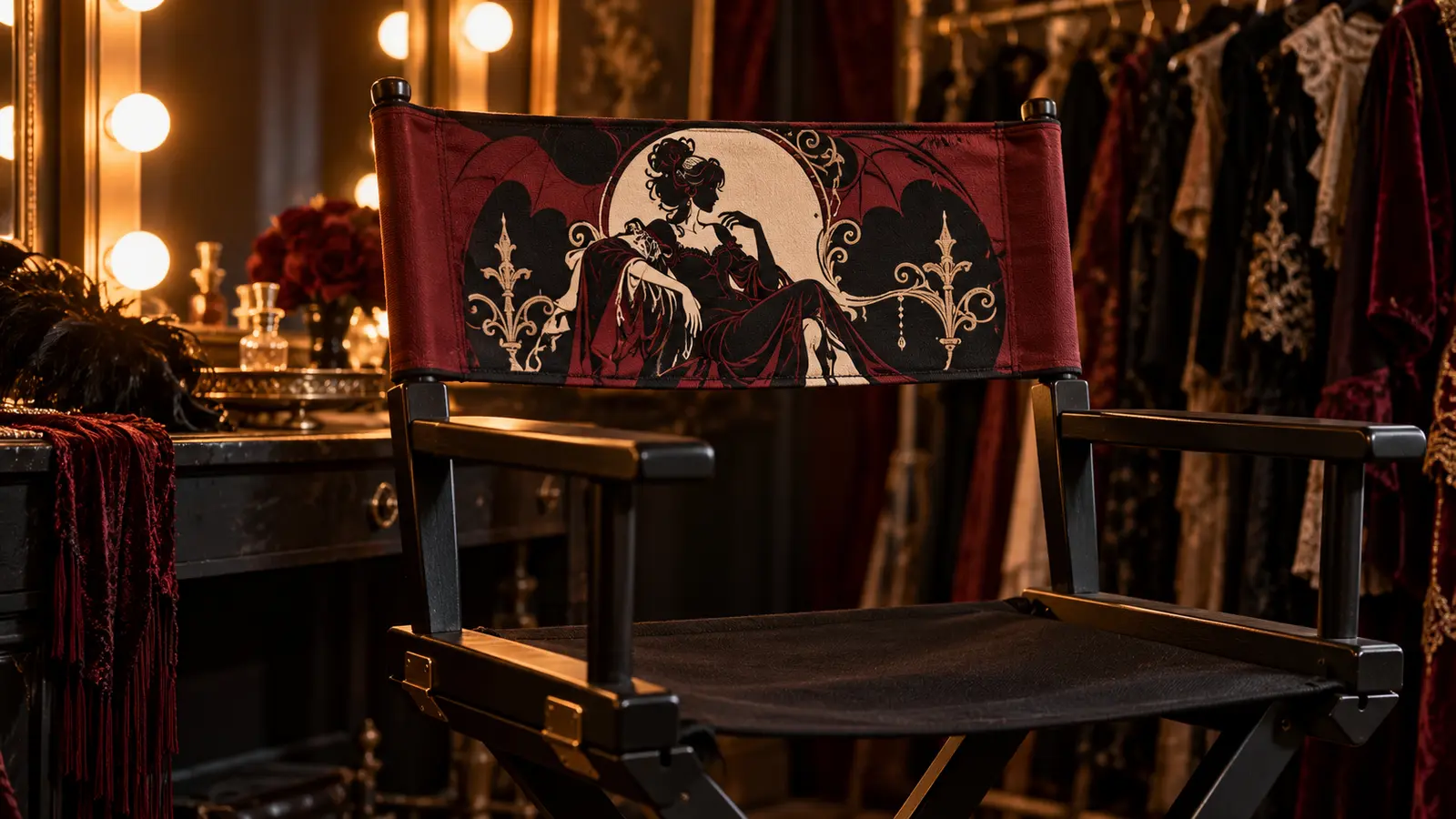
A removable director’s-chair back is a useful place for theatrical artwork: it reads clearly across a room, can be stored flat after the season, and leaves the chair frame unchanged. This project starts with a manufacturer-compatible replacement canvas backrest, then places a simplified two-color HTV design only on the broad center panel. The finished chair works as a dressing-room accent, photo-booth seat, or movie-night prop without putting vinyl across the sleeves or structural seams.
This is an original project plan based on common heat-transfer-vinyl methods for compatible fabric blanks. Replacement-cover dimensions, fiber content, dyes, coatings, seam construction, chair geometry, HTV chemistry, press model, pressure, design scale, and care instructions can all change the result. Test the exact replacement backrest and vinyl, follow the current instructions for every chair, cover, material, cutter, blade, mat, and heat tool, and edit only a duplicate working copy of the purchased artwork. The featured KleanKutChaos listing supplies the seated character artwork; the featured KleanKutChaos file is the design source for this tutorial. This tutorial does not claim that the pictured combination was physically tested with the listing files.
What you’ll need
- Frank N Furter Seated SVG from the featured KleanKutChaos listing
- One sound commercial director’s chair whose maker permits replaceable fabric backs, plus the correct model-specific replacement backrest
- A replacement backrest with a readable fiber-content and care label and a smooth pressable center panel
- Heat-transfer vinyl approved for the backrest fabric; use one finish or two colors specifically approved for layering
- Cricut-, Silhouette-, or similar cutting machine with the blade and mat specified for the selected HTV
- Cutting-machine software and a duplicate working copy of the purchased artwork
- Heat press, EasyPress-style tool, or iron permitted by both the cover and HTV makers
- Firm pressing mat or pad that fits completely inside the printable center panel without crossing seams
- Protective paper or cover sheet only when required by the HTV or heat-tool instructions
- Heat-resistant tape approved for the transfer material
- Cardstock or plain paper for a full-size placement template
- Ruler, flexible tape measure, fabric-safe removable marker or tailor’s chalk, and painter’s tape
- Lint roller, weeding tool, tweezers, scissors, and bright task lighting
- Scrap fabric with similar fiber content for test cuts and heat tests
- The chair maker’s assembly instructions, weight rating, and replacement-cover directions
How to make it
- 1
Confirm the chair and replacement-cover system
Read the chair maker’s model number, weight rating, assembly instructions, and replacement-cover directions. Use only the correct replacement backrest and reject improvised fabric, cracked frames, loose fasteners, bent hinges, split dowels, or chairs whose maker does not permit the back to be removed. The craft changes only the separate fabric piece, never the frame.
- 2
Check whether the blank can take heat
Read the replacement backrest’s fiber-content, coating, and care labels. Confirm that both the fabric maker and HTV maker allow the required application temperature. Do not press waxed canvas, unknown coatings, mesh, vinyl upholstery, melt-prone fabric, waterproof layers, or any blank with padding or hidden plastic unless every maker explicitly approves it.
- 3
Prewash and inspect the replacement back
If the care label allows washing, prewash and dry the backrest exactly as directed and omit fabric softener when the HTV maker requires it. Check for shrinkage, dye transfer, warping, loose stitching, and residue. Press out wrinkles only at a fabric-safe setting, then let the blank return to room temperature.
- 4
Mark the structural no-press zones
Measure the top and bottom sleeves, side hems, reinforcing tape, dowel channels, labels, and every row of stitching. Draw a paper map of the flat center panel and reserve a generous border around every seam. HTV and the heat plate must remain completely outside sleeves and load-bearing construction.
- 5
Make a full-size paper mock-up
Print or sketch the design at final size, trim around its outer shape, and tape it to the mounted chair back. Sit in the chair only if it is fully assembled and safe, then check that the focal artwork remains visible without wrapping over the top edge or disappearing behind a person’s shoulders. Remove the backrest again before any cutting or pressing.
- 6
Simplify a duplicate artwork file
Keep the purchased file untouched and work from a copy. Isolate the seated figure, remove detached specks, enlarge small enclosed spaces, and thicken weak bridges that would be difficult to weed at backrest scale. Preserve the dramatic silhouette while reducing dense facial and costume detail that could fail during flexing.
- 7
Plan the two-color separation
Assign the broad silhouette to cream HTV and reserve burgundy for a few large theatrical accents. Prefer non-overlapping inset or side-by-side pieces. If the chosen products are approved for layering, verify the permitted layer order, tack-press sequence, and maximum number of layers before cutting.
- 8
Test cut and test press
Mirror the sample when required, orient the HTV on the mat exactly as its maker specifies, and cut the smallest enclosed detail plus one narrow bridge. Weed the sample and press it on comparable scrap fabric using the official time, temperature, pressure, cover, and peel instructions. Cool, flex, and wash-test the sample before committing the replacement backrest.
- 9
Cut and weed the final design
Mirror the final artwork when required and cut each color on its own carrier. Weed large negative spaces first, then stabilize narrow details with a finger on the carrier while lifting waste at a low angle. Compare both weeded layers with the on-screen preview and recut any torn or incomplete piece rather than patching it on the chair back.
- 10
Build a flat, seam-free pressing stack
Lay the detached backrest face up and slide the approved pressing pad beneath only the center panel so all sleeves, hems, labels, and seams hang beyond the pad edge. If the heat plate cannot cover the design without crossing a structural seam, reduce the artwork or split it into maker-approved sections; do not force uneven pressure.
- 11
Align the first carrier
Lint-roll the surface, fold the blank lightly to locate its vertical center without creasing the sleeves, and place removable alignment marks outside the artwork. Position the paper template first, replace it with the first carrier, and secure only the carrier’s outer edge with approved heat-resistant tape. Check the border measurement on all four sides.
- 12
Press the base layer
Preheat only when the material instructions call for it. Apply the first color using the exact time, temperature, pressure, protective cover, and peel method specified for the tested HTV and fabric. Lift the tool straight up, keep the carrier still for the required cooling interval, and stop if the fabric shines, puckers, discolors, or smells scorched.
- 13
Add the accent layer
For approved layered HTV, use the manufacturer’s stated short tack press for the base and final press for the accent. For side-by-side colors, align the second carrier to the paper guides and protect every previously applied area as directed. Never let bare vinyl or an exposed carrier edge touch the heat plate.
- 14
Cool, cure, and reinstall safely
Let the decorated backrest cool flat to room temperature, inspect every edge under bright light, and perform only a maker-approved finishing press if needed. Wait the full cure interval before bending, cleaning, or installing it. Reassemble the chair exactly as its maker directs, confirm both sleeves and dowels are fully seated, retighten only the specified hardware, and complete the maker’s stability check before anyone sits.
Practical finishing tips
- Decorate a spare replacement backrest so the original chair cover remains available for everyday use.
- Keep the artwork inside one broad center panel; sleeves and seams need to flex and carry load without heat or extra material.
- A large simplified silhouette reads better from across a room and survives repeated installation better than tiny costume details.
- Photograph the carrier placement before pressing the accent so a damaged piece can be recut at the same scale.
- Use side-by-side colors when layering approval is unclear; a narrow fabric gap creates a crisp outline without stacked HTV.
- Store the cured backrest flat or loosely rolled in the direction its maker permits, never sharply folded through the design.
Troubleshooting
Return the carrier to its original position and repress only according to the material’s official instructions. Verify the required peel temperature and pressure before trying again; do not add unapproved heat or time to compensate for an incompatible blank.
Check whether the carrier was cut too deeply, then enlarge the artwork, thicken the weakest bridges, or remove tiny features from the duplicate file. Recut the affected layer rather than assembling loose fragments on the fabric.
The pressing pad or heat plate probably crossed a seam or lost pressure. Resize or reposition the design on a truly flat zone and recut the affected section; repeated heating over a sleeve can damage the load-bearing fabric.
Remove it from the pressing stack and let it relax flat. Compare the test result, temperature, pressure, and fabric instructions. Do not stretch or overpress the panel; replace the blank if the heat has permanently distorted its fit.
Stop before forcing the sleeves or dowels. Confirm that the replacement cover matches the chair model, is oriented correctly, and has fully cooled. Heat damage or shrinkage can make a backrest unsafe; replace it rather than trimming sleeves or modifying the frame.
Ways to make it yours
Use a single cream silhouette, enlarge it, and remove the smallest interior details for one cut, one weed, and one press cycle.
Decorate two separate maker-approved replacement backs—one gothic Halloween and one neutral—then swap the complete fabric pieces instead of adding vinyl to both sides of one blank.
Add a separate broad word or date below the silhouette only when there is enough flat center-panel clearance and the lettering remains outside every seam.
Mount the purchased artwork on a separate rigid sign behind an undecorated chair when the replacement cover cannot safely take heat; secure the sign with its own rated stand rather than attaching anything to the chair.
Keep crafting
- DIY Gothic Halloween Costume Garment Bag With Cricut HTV — Personalize a fabric garment bag with a dramatic gothic cut file, a press-safe layout, and practical details that protect Halloween costumes between events.
- DIY Gothic Candelabra Canvas Pillow With Metallic HTV — Turn a plain black canvas pillow cover into polished gothic décor with a large silver candelabra cut from metallic heat-transfer vinyl.
- DIY Gothic Corset Halloween Favor Boxes With Cricut or Silhouette — Turn sturdy cardstock, tiny eyelets, and satin ribbon into structured gothic corset favor boxes for Halloween parties, movie nights, or dramatic place settings.
Inspiration & further reading
This is an original Klean Kut Halloween Crafts project inspired by approachable techniques shared across trusted craft and home sources. Explore Cricut Everyday Iron-On instructions, Cricut heat-transfer blank preparation guidance, Cricut Autopress iron-on and seam guidance, Silhouette Smooth Heat Transfer material guidance and U.S. Consumer Product Safety Commission Art and Craft Safety Guide for more ideas and technique background.