
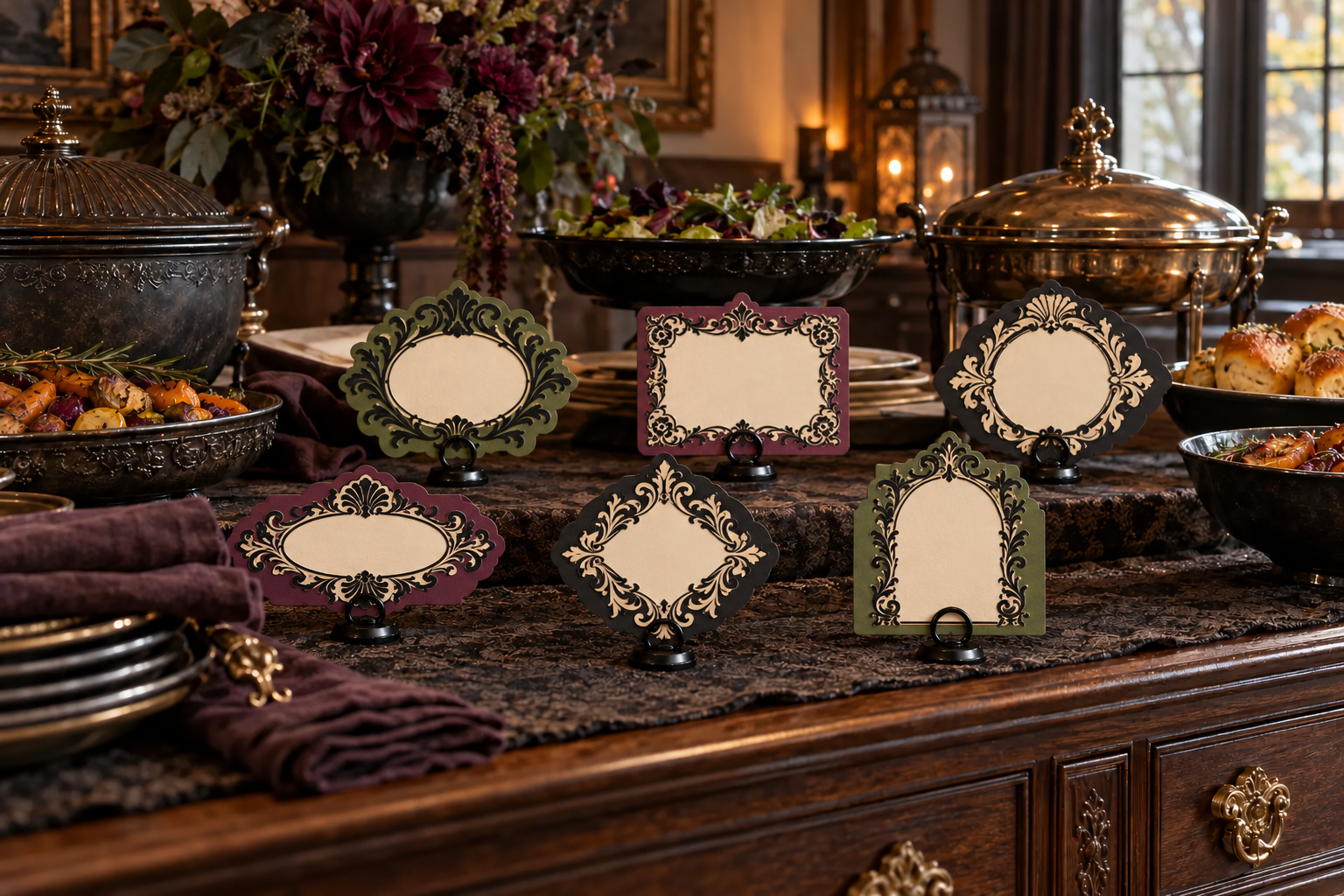
A good buffet label should be easy to read, easy to replace, and stable enough that guests do not have to touch it. This set uses one printed ornamental frame as the front, a plain cut-cardstock back, and narrow spacer strips along three edges to create a top-loading pocket. A small handwritten or home-printed insert slides into the pocket, so the decorative shell can be reused for different menus. Each finished label sits in a complete factory-made place-card holder several inches away from platters, heat, spills, serving utensils, and traffic paths.
This is an original construction plan based on ordinary Print Then Cut, cardstock, and paper-assembly methods. Printer ink, cardstock coating, grain direction, blade condition, mat tack, adhesive, humidity, holder geometry, and software settings can all change the result. Follow the current directions for the exact printer, ink, cutter, blade, mat, paper, adhesive, and holder, and make one complete prototype before producing the set. The KleanKutChaos listing supplies the featured digital frame artwork only. The featured KleanKutChaos file is the design source for this tutorial, and this tutorial does not claim that the pictured combination was physically tested or that any paper craft is food-safe.
What you’ll need
- 20 Baroque Frame SVG Bundle from the featured KleanKutChaos listing, using one frame with a broad outer silhouette and openings large enough to survive cutting
- Six complete factory-made metal or wood place-card holders with flat stable bases, smooth card slots, and current care directions
- Matte white or very light printable cardstock explicitly compatible with both the printer and the cutter's Print Then Cut sensor
- Two or three sheets of matte solid-core cardstock for backing panels and optional accent layers
- Plain white lightweight cardstock or heavy paper for replaceable menu inserts
- Compatible home printer with adequate ink and current printer instructions
- Cricut, Silhouette, or similar Print Then Cut-capable machine with current software, a clean fine-point blade, and the specified mat
- Plain white non-textured copy paper for calibration and paper prototypes
- Low-profile paper adhesive such as archival PVA applied sparingly with a fine applicator, or thin double-sided tape approved for the selected papers
- Metal ruler, pencil, bone folder, paper trimmer, small scissors, and a self-healing work mat
- Low-tack painter's tape or removable notes for marking prototypes and finished label positions
- Fine-tip permanent marker or home printer for the disposable inserts; use only after checking that the ink is dry and does not transfer
- A stable, dry, brightly lit work surface away from food preparation and service
- Safety glasses plus any hand or eye protection required by the cutter, blade, adhesive, printer, or paper makers
How to make it
- 1
Choose stable finished holders
Select six matching factory-made holders whose bases sit flat and whose slots hold cardstock without sharp burrs, excessive pinch pressure, or wobble. Reject holders with loose parts, exposed rust, peeling finish, cracked wood, damaged feet, or a slot so narrow that it crushes the planned layers.
- 2
Define the no-craft food boundary
Before designing, choose a display area outside platters, beverage dispensers, warming equipment, open flames, sneeze guards, utensil rests, spills, and guest reach paths. The labels are decorative signs, not food-contact articles. Plan to keep every paper edge, adhesive joint, and holder base on a separate clean dry surface.
- 3
Measure the real holder slot
Measure the usable slot width, depth, and safe thickness on one holder. Fold a plain-paper strip to approximate the final layers and insert it without force. Record the largest size that stands upright while leaving enough visible card below the artwork for a secure grip.
- 4
Set one finished label size
Choose a common finished size—about 4½ by 3 inches works for many holders, but the actual hardware controls the dimensions. Keep the decorative frame inside the safe print-and-cut area shown by the current software, and leave at least a quarter-inch plain gripping zone at the bottom.
- 5
Calibrate Print Then Cut if needed
If the machine requests calibration or recent cuts have been offset, follow the current calibration flow before using specialty paper. Print the calibration sheet on plain white non-textured copy paper at 100 percent scale with no fit-to-page adjustment, then complete the on-screen cuts and selections.
- 6
Build a reusable master template
Create a rounded-rectangle front panel, a matching solid back panel, and a centered insert window. Add a top opening wide enough for a replaceable card, then duplicate the template only after the first prototype works. Keep a locked master copy with dimensions noted.
- 7
Simplify one baroque frame
Duplicate the purchased artwork and preserve the original download. Choose a frame with thick connected scrollwork, remove tiny detached specks and hairline details, and resize it proportionally inside the front panel. Do not stretch the artwork or add detail smaller than the paper and blade makers recommend.
- 8
Prepare the printable front
Place the simplified frame over the light front panel, add only artwork you own or are licensed to use, then flatten the printable layers so the machine cuts the intended outer contour rather than every internal printed element. Leave the central insert window visually plain and high contrast.
- 9
Make a plain-paper prototype
Print the front on ordinary paper, cut the back and three spacer strips by hand, and assemble them temporarily with low-tack tape. Slide in a sample insert, place the prototype in the holder, and check readability, stability, finger clearance, slot fit, and the ease of replacing the insert.
- 10
Run a representative material test
On scraps of the actual printable cardstock, print one dark scroll, one fine curve, and the cut sensor marks. Let the ink dry, then test the chosen cut setting. Confirm that the sensor reads the page, the cut follows the outline, the surface does not smear, and the cardstock releases without curling or tearing.
- 11
Print in one uninterrupted flow
Arrange the six fronts within the software's current printable-area limits. Send the job from the cutter software to the selected printer and complete printing and cutting in the same workflow. Do not export the sensor-mark page to a separate PDF or resize it in another program.
- 12
Let ink dry before loading
Place the printed sheet flat on a protected dry surface for the ink maker's full drying interval. Keep hands off the sensor marks and printed scrollwork. When dry, align the sheet on the specified mat exactly as the software shows and smooth only the unprinted margins.
- 13
Cut and release the printed fronts
Allow the machine to scan every sensor mark before cutting. When finished, turn the mat face down and peel the mat away from the cardstock instead of curling the printed piece upward. Stop if the blade drags, the sensor repeatedly fails, or fine scrolls begin to tear.
- 14
Cut backs and spacers separately
Cut six solid back panels from colored cardstock, then cut narrow spacer strips for the left, right, and bottom edges. Use cut-only operation for these pieces. Keep the top edge open and make every spacer identical so the insert channel stays square.
- 15
Assemble one complete pocket
Dry-stack one front, three spacers, and one back. Apply the smallest continuous amount of approved adhesive to the spacers, keeping it away from the insert channel and outer edge, then press the layers flat under a clean paper-covered weight only if the adhesive maker allows it. Let the prototype cure fully.
- 16
Test the replaceable insert
Cut a plain insert slightly narrower than the pocket and tall enough to grasp above the opening. Write or print a sample dish name, let the ink dry, and slide it into place. Trim the insert—not the finished pocket—if it binds or buckles.
- 17
Batch the remaining five labels
Use the successful prototype as the physical reference for the rest of the set. Check each pocket with the same gauge insert before the adhesive cures, wipe only with the method approved for the paper and adhesive, and discard any piece with exposed glue, delamination, or a distorted slot.
- 18
Position, label, and inspect the buffet
Place each finished sign in its holder on the planned dry display surface, add accurate replaceable inserts, and confirm that no label can tip into food or obstruct a lid, utensil, cord, control, or guest path. Verify ingredients and allergens with the cook or package rather than relying on a decorative label alone.
- 19
Retire inserts and store the shells
After service, remove the paper inserts and discard any that are damp, stained, or handled with food-soiled hands. Never wash or submerge the cardstock shells. Let clean dry holders cool and dry as their maker directs, then store the label shells flat in a rigid envelope away from heat, moisture, pests, and crushing.
Practical finishing tips
- Use one frame shape in three coordinated colors; repeating the silhouette makes the set look intentional while color can loosely group mains, sides, and sweets.
- Keep the center panel pale and quiet. A high-contrast handwritten insert is easier to replace and read than tiny permanent type printed into the ornament.
- Add a small removable number to the back of every shell and holder so the same pairs return together after storage.
- Print two or three blank insert sheets at once and store them with the finished shells for quick menu changes.
- Place labels in front of—not on, under, or behind—serving dishes so guests can read them without reaching across food or hot equipment.
- For allergen-sensitive service, use the host's verified written ingredient information and established food-service procedures; decorative labels are not a substitute for confirmation.
Troubleshooting
Stop and check the current machine guidance, lighting, material finish, mat placement, printer output, and sensor-mark condition. Move to matte white or light compatible stock, remove glare, and recalibrate if directed. Do not redraw, cover, or manually alter the printed sensor marks.
Recalibrate with the exact plain-paper method specified for the machine, confirm that the page was printed at 100 percent with no fit-to-page scaling, and repeat one small material test. Reprint rather than trying to hide a shifted edge with ink or hand trimming.
Simplify the artwork further, enlarge narrow bridges, use a fresh compatible blade and the correct mat tack, and reduce detail instead of adding pressure blindly. Release the cut with the mat face down so the paper stays flatter.
Remove the insert and trim a new one narrower. If the channel itself contains squeezed adhesive or misaligned spacers, remake that shell; forcing an insert can split the frame and leave loose fibers near the table.
Take it out of service and compare its layer thickness and bottom grip zone with the successful prototype. Use a holder designed for the finished thickness or remake the shell. Do not wedge it with loose paper, tape the holder to furniture, or add weight to the card.
Remove the entire label and holder from service without carrying it over food. Discard the insert and any wet, stained, delaminated, or contaminated cardstock shell; clean the factory-made holder only by its own care instructions before reuse.
Ways to make it yours
Print the frame in black on warm-white matte cardstock and use black backing panels for a high-contrast set with the fewest color decisions.
Scale the tested pocket down for guest names, then position each holder above the place setting and away from plates, glasses, candles, and cutlery.
Use the reusable shells for prices or material notes on a dry display shelf, keeping them separate from products and following the venue's sign requirements.
Use fictional names only on sealed empty display vessels, never on real food, medicine, cleaners, chemicals, or consumable liquids, and keep the paper signs away from spills.
Keep crafting
- DIY Halloween Classroom Visual Schedule Pocket Chart With Cricut Print Then Cut — Make a reusable Halloween classroom visual schedule with clear pocket-chart cards, high-contrast routine labels, and spooky-school borders cut before laminating.
- DIY Gothic Vellum Lantern Centerpiece With Cricut or Silhouette — Build a fold-flat gothic lantern from black cardstock and plum vellum, using ornate cut-file frames to turn a battery LED into a dramatic, flame-free centerpiece.
- DIY Witchy Yellow Brick Road Book Nook With Layered Cardstock — Build a moody storybook book nook with layered cardstock scenery, a winding gold road, and safely separated battery lighting.
Inspiration & further reading
This is an original Klean Kut Halloween Crafts project inspired by approachable techniques shared across trusted craft and home sources. Explore Cricut: How to Print Then Cut in Design Space, Cricut: Print Then Cut compatible materials, Cricut: Calibrating for Print Then Cut and U.S. Consumer Product Safety Commission Art and Craft Safety Guide for more ideas and technique background.