
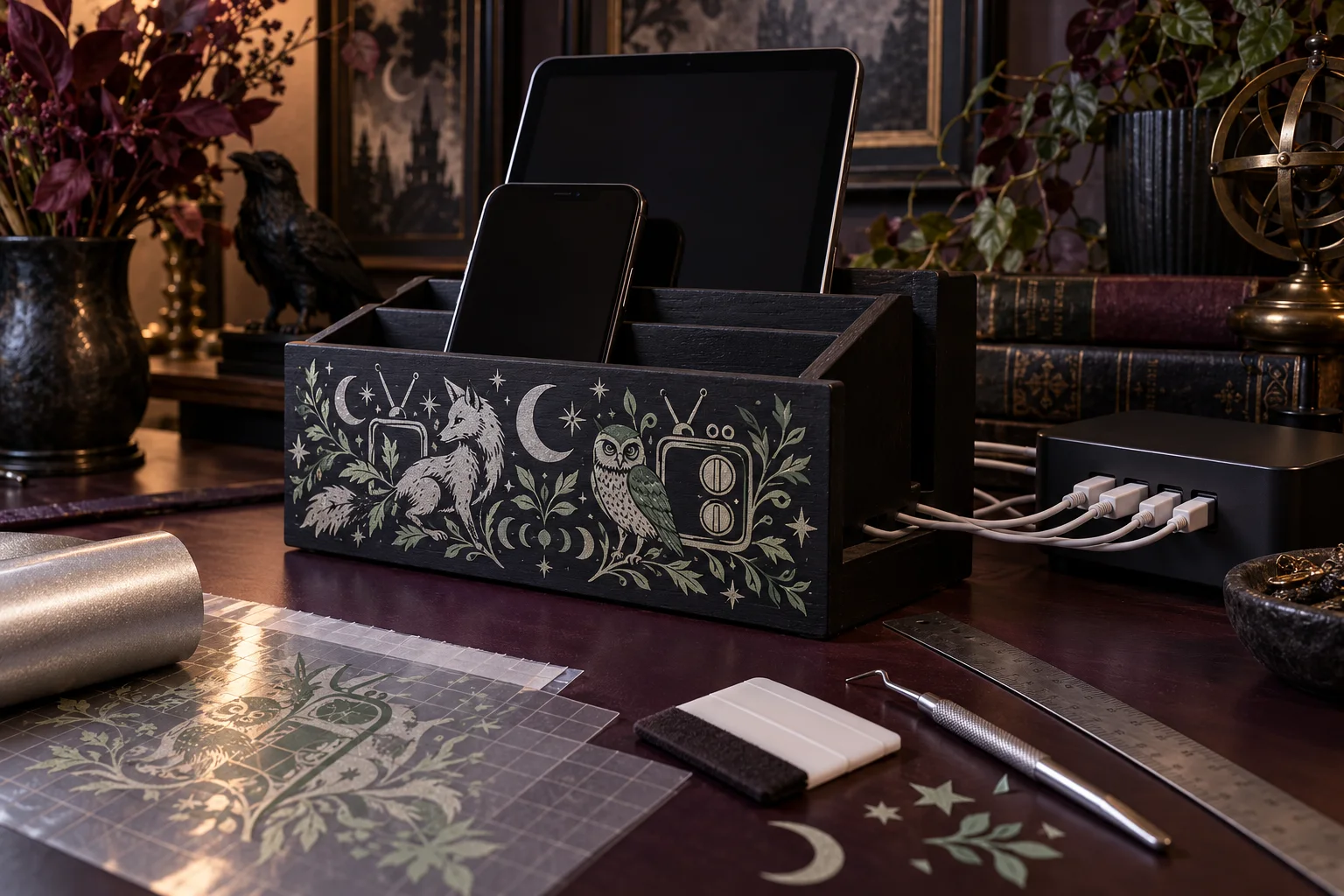
A passive desktop dock can corral several devices without enclosing, rewiring, or altering their chargers. This project begins with a stable ready-made wood or metal organizer whose open slots fit your devices and whose rear cable channels remain visible. A restrained adhesive-vinyl composition goes on one smooth, cool front panel. The charger stays separate, manufacturer-approved, and fully ventilated, so the craft portion remains decoration rather than an electrical modification.
This is an original project plan based on standard home-cutter and adhesive-vinyl methods. Dock finish, surface coating, vinyl formula, transfer tape, blade, mat, artwork detail, device cases, cable plugs, charger rating, ventilation needs, and room temperature can all change the result. Follow the current instructions for every exact product and make a surface test before committing. The KleanKutChaos listing supplies the featured digital artwork only. The featured KleanKutChaos file is the design source for this tutorial, and this tutorial does not claim that the pictured combination was physically tested with the listing files.
What you’ll need
- Future Omen SVG Bundle from the featured KleanKutChaos listing
- One stable, ready-made passive desktop charging dock or letter organizer in finished wood or powder-coated metal, with open slots, smooth exterior panels, and factory-made cable channels; do not use a dock that encloses a charger or blocks device vents
- The original or manufacturer-approved chargers and undamaged charging cables for every device; keep the charging hub or power adapters outside the organizer unless the organizer maker explicitly rates an internal compartment for them
- Permanent or removable adhesive vinyl approved for the organizer's exact finish; pale silver, cream, or muted sage reads clearly on a dark surface
- Compatible standard-grip transfer tape, using strong-grip tape only when the vinyl maker specifies it
- Cricut, Silhouette, or similar cutting machine with current software, a clean fine-point blade, and the mat specified for the vinyl
- Isopropyl alcohol or another surface cleaner only if both the organizer and vinyl makers approve it, plus a lint-free cloth
- Paper, pencil, removable painter's tape, ruler, flexible measuring tape, and a paper template of the front panel
- Weeding hook or tweezers, scissors, scraper or squeegee, brayer, and a burnishing card
- Small vinyl scraps for an adhesion and removal test in a hidden area
- Reusable cable labels or hook-and-loop cable ties; never cinch a cable sharply or cover its safety markings
- Safety glasses and any protective equipment required by the cutter, vinyl, cleaner, dock, device, and charger makers
How to make it
- 1
Choose a passive organizer
Select a ready-made dock that merely holds devices and routes cables. It should sit flat without rocking, have smooth edges, and leave device speakers, microphones, cameras, buttons, charging ports, and ventilation openings exposed. Avoid mystery electronics, built-in batteries, homemade wiring, enclosed power strips, and any organizer whose maker prohibits the intended device size or orientation.
- 2
Audit the entire charging setup
Inspect each charger, cable, plug, device, and case for heat damage, bent pins, fraying, swelling, cracks, recalls, or loose connections. Use only the charger and cable combination approved by the device maker. Replace damaged equipment before crafting, and do not decorate a charger, cable, plug, power strip, battery, or device.
- 3
Map the no-vinyl zones
Unplug everything and place the empty organizer on the desk. Mark every cable slot, device-contact edge, screw, hinge, label, ventilation opening, foot, and high-friction area. Add a generous buffer around each one. The motif belongs only on a cool, flat exterior panel that never contacts a device or hides a safety label.
- 4
Dry-fit the real devices
Place each device in its intended slot with its ordinary case installed, but do not connect power. Confirm that every item can be inserted and removed without scraping, tipping the dock, bending a plug, or pulling on a cable. Change the organizer or arrangement if a connector bears the device's weight.
- 5
Make a full-size paper template
Trace the decorative panel and all no-vinyl buffers onto paper. Print or cut paper silhouettes of a fox, owl, retro television, moons, stars, or botanical accents from the purchased bundle. Arrange them inside the safe area, leaving broad breathing room so the design remains readable behind devices.
- 6
Prepare a cuttable composition
Open a duplicate working copy of the purchased files and preserve the originals. Choose one animal focal, one retro-tech accent, and a few simple celestial shapes. Weld or group only where the design requires it, and remove isolated details that fall below the vinyl maker's recommended minimum size at the final dimensions.
- 7
Plan color and registration
Limit the project to one or two vinyl colors. For two colors, create small registration squares outside the finished artwork and place each color in its own cut layer. Design adjacent color areas instead of stacking large sheets, which makes the finish bulky and can increase the chance of lifting.
- 8
Test the hidden surface
Clean a concealed spot by the method approved for the organizer, let it dry, then apply a small vinyl sample. After the vinyl maker's stated dwell time, check adhesion and removability. Stop if the finish softens, stains, lifts, clouds, or transfers to the adhesive; switch to a compatible removable vinyl or leave the organizer undecorated.
- 9
Clean the decorative panel
With the dock empty and all power disconnected, remove dust and skin oils from the front panel. Use only the cleaner approved by both makers, keep liquid away from seams and hardware, and allow the surface to dry fully. Do not sand, heat, or chemically strip an unknown coating.
- 10
Run a test cut
Place vinyl on the correct mat, load the fine-point blade, and cut a small star or square using the material maker's current setting. Weed it and confirm that the vinyl is cut cleanly while the liner remains intact. Adjust only within the machine and material guidance before sending the final layers.
- 11
Cut and weed the artwork
Cut the design at the verified size without mirroring ordinary adhesive vinyl. Weed the surrounding material and interior openings while the sheet stays flat. Replace any stretched, torn, or incomplete detail rather than trying to disguise it during application.
- 12
Apply transfer tape
Lay the specified transfer tape over the first color and burnish from the center outward. Turn the piece over and peel the liner back at a low angle, keeping the artwork on the tape. Trim the carrier into manageable sections only when the composition can be aligned without distortion.
- 13
Hinge the first layer
Position the artwork over the paper-template marks and secure its center with a strip of painter's tape to make a hinge. Lift one side, remove that half of the liner, squeegee the vinyl down from the hinge outward, then repeat on the other side. Keep every edge inside the safe decorative panel.
- 14
Remove tape and add color two
Peel transfer tape slowly back over itself while holding the vinyl in place. Align the second color with the registration squares, hinge and burnish it the same way, then remove the squares. Do not use a heat gun or hair dryer near the organizer, chargers, devices, or vinyl.
- 15
Route cables without strain
After the vinyl has reached the maker's stated cure or dwell time, place the external charger where air can circulate around it. Route each undamaged cable through an existing channel with a gentle bend radius and enough slack for insertion. Use loose reusable ties outside hot or moving areas; never staple, pinch, knot, tape over, or tightly coil a charging cable.
- 16
Complete a supervised function check
Connect one device at a time using its approved equipment. Watch for rocking, tight connectors, unexpected warmth, odor, noise, charging errors, or blocked airflow. Disconnect immediately if anything is abnormal. When every position passes independently, label the cable ends and use the station only where it remains visible, dry, stable, and easy to unplug.
Practical finishing tips
- A wide fox or owl silhouette with one retro screen is easier to weed and read than six tiny full illustrations.
- Place the motif low enough to remain visible but clear of the desk edge where hands, cables, and device cases rub.
- Photograph the empty dock with painter's-tape boundaries before cutting; it is a reliable placement reference at the transfer table.
- Use different reusable cable labels rather than vinyl directly on flexible cables or plugs.
- Keep the charger's model and safety label visible so ratings and recall information remain easy to check.
- Dust the slots regularly with power disconnected; lint buildup and tightly packed objects reduce airflow.
Troubleshooting
Stop burnishing and review the surface and vinyl compatibility. Powder coating, wax, silicone, oil, texture, or a fresh paint cure can defeat adhesion. Use a maker-approved removable vinyl on a different compatible panel, or leave the dock undecorated rather than adding heat or aggressive solvent.
Return the transfer tape, burnish from both sides, and peel the liner slowly at a low angle. If details still fail, enlarge or simplify them and recut; stronger transfer tape can damage delicate finishes and should be used only when specified.
Lift it only if neither maker's guidance risks damaging the surface, then replace the piece with fresh vinyl. For the recut, use two widely spaced registration squares and secure a center hinge before removing the liner.
Move or reduce the vinyl composition so it remains entirely outside contact zones. Do not line the slot with extra adhesive material, which can narrow the fit and transfer residue to a device.
Disconnect power and stop using that position. Add no improvised blocks around the plug. Choose a compatible organizer or the device maker's approved right-angle cable only if explicitly supported, and ensure the dock—not the connector—carries the device weight.
Unplug it, move the device to a nonflammable clear area, and follow the device and charger manufacturers' troubleshooting guidance. Do not cover, fan, modify, or continue charging equipment that is swollen, damaged, recalled, or behaving abnormally.
Ways to make it yours
Use one broad silver animal-and-moon composition for faster weeding and a calmer look on a narrow dock.
Choose a removable vinyl approved for the finish and keep the same no-vinyl buffers, understanding that removability still requires a hidden-area test.
Apply the woodland-tech motif to a passive letter organizer used only for notebooks and mail, omitting every charging component.
Repeat one small moon or antenna motif on a compatible pencil cup and document tray, testing each different surface separately.
Keep crafting
- DIY Witchy Pegboard Craft Tool Organizer With Removable Vinyl — Turn a plain pegboard into a flexible craft-tool station with removable witchy decals, clearly labeled zones, and a load plan that keeps sharp and heavy supplies secure.
- DIY Dark Fantasy Faux-Leather Dice Tray With Metallic HTV — Make a collapsible gothic dice tray from faux leather, metallic HTV, and four snap-fastened corners—complete with a paper fit test and a heat-safe application plan.
- DIY Celestial Moth Magnetic Message Board With Cricut Vinyl — Turn a smooth metal memo board into useful celestial décor with a bold moth, moon phases, and a clear space for everyday notes.
Inspiration & further reading
This is an original Klean Kut Halloween Crafts project inspired by approachable techniques shared across trusted craft and home sources. Explore Cricut Vinyl instructions, Cricut Transfer Tape Instructions, U.S. Consumer Product Safety Commission: Batteries and U.S. Consumer Product Safety Commission Art and Craft Safety Guide for more ideas and technique background.