
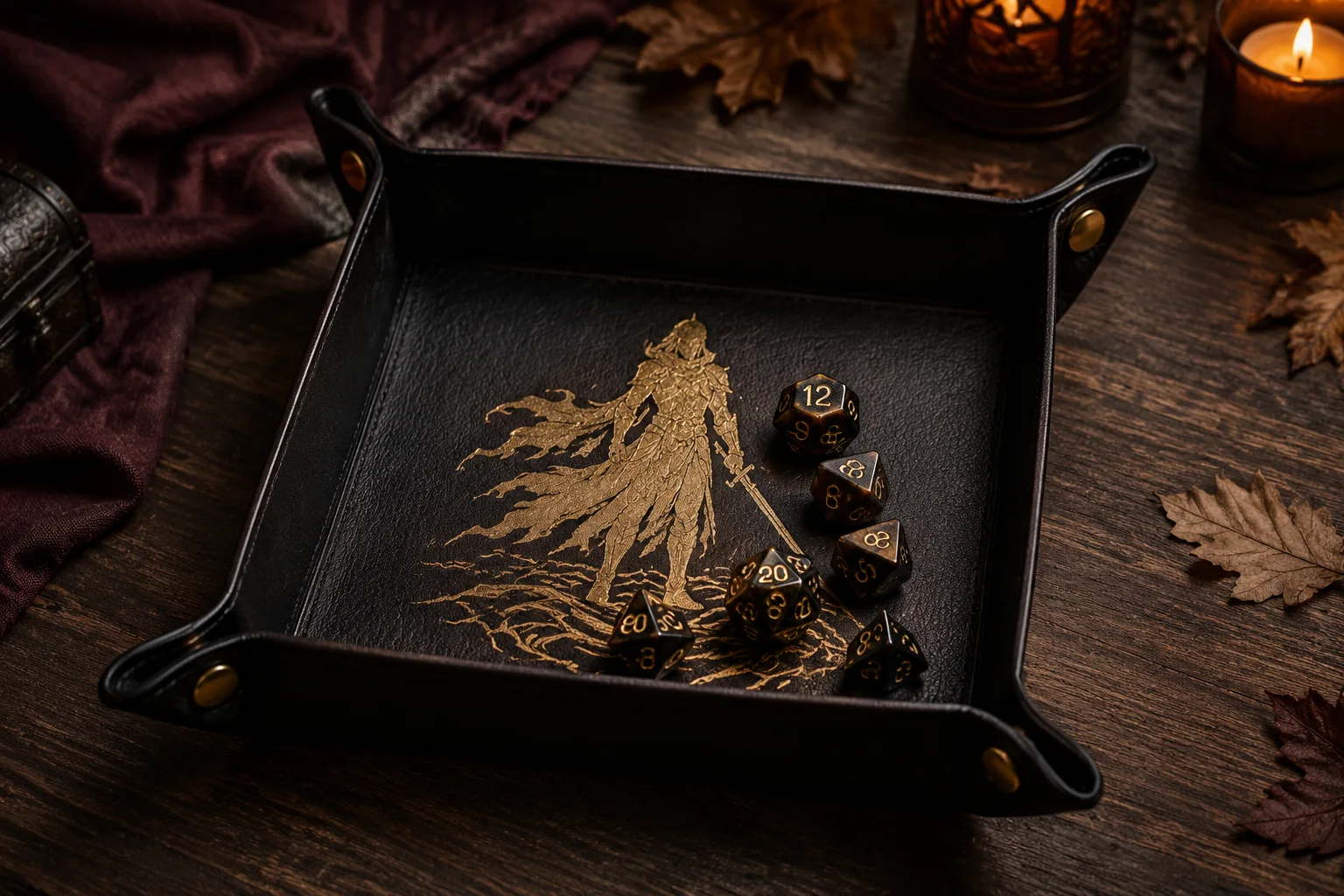
A snap-corner dice tray travels flat, then turns into a quiet rolling surface when the four corners are fastened. This version uses a single metallic shadow-warrior silhouette inside a dark faux-leather square, leaving a generous plain landing zone so dice remain readable. The project also works as a small valet tray for keys or jewelry when game night is over.
This is an original project plan based on manufacturer-described faux-leather cutting, iron-on application, and four-part snap-setting methods. Faux-leather thickness, backing, coating, heat tolerance, blade condition, mat grip, HTV adhesive, press model, snap-post length, and setter geometry vary. Make the complete paper prototype, cut and heat-test scraps from the exact materials, and follow the current directions from every material, cutting-machine, heat-tool, and hardware maker. The featured KleanKutChaos file supplies the decorative artwork; it does not include the tray pattern or hardware layout described here. This exact combination has not been represented as physically tested.
What you’ll need
- Dark Fantasy Shadow Warrior SVG from the featured KleanKutChaos listing
- One smooth, paper-thin faux-leather sheet large enough for the tray blank, ideally 10 to 12 inches square; confirm cutting-machine and heat compatibility
- Metallic, foil, or smooth iron-on vinyl compatible with the exact faux leather
- Cricut-, Silhouette-, or similar cutting machine with the blade and mat recommended for the chosen materials
- Plain cardstock or heavyweight copy paper for a full-size folding prototype
- Fine-point marker or removable marking pencil suitable for the faux-leather backing
- Metal ruler, self-healing mat, rotary cutter or sharp craft knife for hand trimming if the faux leather is not machine-approved
- Weeding tool, fine tweezers, brayer, and small sharp scissors
- Heat press or small heat tool approved for the chosen HTV and faux leather
- Heat-resistant pressing mat, protective sheet, heat-resistant tape, and pressing cloth only as permitted by the material makers
- Four complete sets of line-20, line-24, or other four-part snaps whose post length matches the material thickness
- Matching snap setter, anvil, hole punch, and rawhide or poly mallet
- Scraps of the exact faux leather and HTV for cut, heat, peel, flex, and snap tests
- Eye protection, heat-resistant gloves, and a stable work surface
- Optional edge paint or flexible leather-edge finish confirmed compatible with the faux material
How to make it
- 1
Choose a finished size and make the paper blank
Start with a 10-inch paper square for a tray with an approximate 6-inch floor and 2-inch walls, or resize the proportions for your table. Mark a 2-inch square at each corner as a folding guide but do not cut those corner squares away. The material must remain one continuous piece so each corner can pinch upward and fasten into a wall.
- 2
Prototype every folded corner
Pinch the two sides of one paper corner together so the diagonal fold points outward, then secure it temporarily with a binder clip. Repeat at all four corners. Set several dice inside, roll them gently, and check wall height, landing area, hand clearance, and stability. Adjust the wall depth or overall square now; hardware cannot correct awkward geometry later.
- 3
Map the snap pairs on paper
With a corner pinched in its final position, mark one hole on each overlapping flap where the snap can close without sitting on the diagonal crease. Keep all four pairs the same distance from their corner and edges. Open the prototype flat, label CAP/SOCKET and STUD/EYELET sides, and confirm that every male and female half will face correctly when assembled.
- 4
Build a protected design zone
Draw the finished tray floor on the flat paper pattern and inset it by at least one-quarter inch. Keep the warrior, weapon, and every HTV edge inside this protected zone so the transfer will not cross a wall fold, snap hole, or heavily flexed corner. A motif around 4½ to 5½ inches tall usually leaves a useful rolling area in a 6-inch floor, but use the prototype rather than a fixed number.
- 5
Simplify the shadow-warrior artwork
Import the SVG, lock its proportions, and inspect it at final size. Remove hairline cuts, tiny floating islands, and narrow gaps that are unlikely to weed cleanly. Preserve the spiky outer profile and oversized key-shaped blade, then weld overlapping pieces into one bold silhouette. Make a one-inch detail sample containing a hair point, hand, and inside corner before cutting the full motif.
- 6
Test-cut the exact faux leather
Place a small scrap on the recommended mat in the orientation specified by its maker, brayer it flat, and tape edges only when current machine guidance permits. Select the named faux-leather setting for your machine and run a small corner-and-curve test. The blade should cut cleanly without chewing the backing. If the sheet is too thick, stretchy, textured, or unsupported, use the paper template, ruler, and rotary cutter instead of forcing it through the machine.
- 7
Cut the tray blank
Transfer the approved square and snap-hole marks to the back of the faux leather. Cut the outer perimeter in one piece and round each outer corner slightly to reduce wear. Do not cut the diagonal corner folds. Before adding decoration, pinch all four corners and compare the blank with the paper prototype; correct only small perimeter irregularities and never trim into a planned snap hole.
- 8
Test the complete heat stack
Mirror the sample motif, cut it from the chosen HTV with the shiny carrier side down when its maker specifies, and weed it. Press it onto a faux-leather scrap using the exact protective layers, support, temperature, pressure, time, and peel method supplied for that HTV/base/press combination. Let it cool as directed, then flex, rub, and lightly crease the scrap. Reject settings that scorch, shrink, gloss, bubble, harden, delaminate, or emboss the faux leather.
- 9
Cut and weed the mirrored full design
Mirror the approved warrior because iron-on is cut from the reverse side. Run the saved test-cut setting, then weed broad negative areas before the narrow hair, hand, and weapon openings. Keep the carrier sheet intact and trim it to a manageable margin so it can sit completely inside the protected tray floor without covering a fold or snap mark.
- 10
Center and press the motif
Lay the faux-leather blank flat on the maker-approved pressing surface and align the design from the paper map. Secure the carrier with heat-resistant tape only if the product directions allow it. Apply the approved heat stack and settings without sliding the press. Peel the carrier at the specified temperature, then allow the blank to cool flat and undisturbed before flexing it.
- 11
Punch and test one snap on scrap
Use scrap layers that match the tray thickness. Punch the smallest clean hole accepted by the snap maker, identify the cap, socket, stud, and eyelet, and set one full pair with the matching anvil and setter. Close and open it several times. If the post crushes, spins, bends, or fails to lock, change to hardware with the correct post length or the maker-recommended tool before touching the finished blank.
- 12
Punch the eight mapped holes
Return the cooled tray to the flat paper pattern and transfer all snap marks precisely. Punch one hole at a time over a proper punch surface, keeping the tool perpendicular. After the first corner pair is punched, pinch it together and confirm alignment before punching the other six holes. Never enlarge a misplaced hole toward an edge; revise the matching position or remake the blank if strength would be compromised.
- 13
Set the four corner pairs
Install each four-part snap in the orientation labeled on the prototype, supporting the decorative cap in the matching anvil recess. Hold the setter vertical, wear eye protection, and use controlled mallet strikes on a stable surface. Test each pair before moving on. The hardware should sit firm and flat without cutting the faux leather, trapping a wrinkle, or interfering with the HTV.
- 14
Shape, inspect, and use the tray
Snap all four corners and gently hand-form the walls along the planned fold lines without scoring or sharply creasing the surface. Set the tray on a level table, roll a few dice from normal hand height, and confirm that the base stays flat and every snap remains closed. Unsnap the tray for storage rather than forcing the folded corners backward; wipe it only with the cleaning method approved for the faux leather and HTV.
Practical finishing tips
- Keep the metallic silhouette slightly off-center if the weapon is visually heavy; the overall shape can look centered even when its bounding box is not.
- Photograph the labeled paper snap map before punching the faux leather so cap, socket, stud, and eyelet orientation stays unambiguous.
- Use a fresh blade and a clean, adequately sticky mat for paper-thin faux leather; repeated passes can drag a stretchy backing out of alignment.
- Round the blank’s outer corners with a coin-size template to reduce sharp points without sacrificing the snap area.
- Store the tray open and flat with the snaps released so the walls and HTV are not held under constant stress.
Troubleshooting
The heat stack, temperature, dwell time, or pressure is unsuitable for the exact coating. Stop, let the piece cool flat, and return to scraps using only settings approved by both material makers. Replace a visibly damaged blank rather than trying to press it flat again.
Let the transfer reach the specified peel temperature, lay the carrier back down without shifting, and reapply only the maker-approved heat. If the sample also fails, enlarge or simplify fragile details and retest rather than increasing heat blindly.
The post may be too long, the hole too large, or the setting force uneven. Remove it only with a method approved for the hardware and material, then test the correct post length on scrap. Do not glue a loose snap or strike it repeatedly on the finished tray.
Compare the eight hole positions with the paper map. One pair may be offset or a flap may be folded in the opposite direction. Correct assembly orientation first; if a hole is misplaced, remake the blank rather than stretching the faux leather into symmetry.
The floor is too small, the walls too low, or the hardware sits too far inward. Use smaller dice, revise the paper prototype with a larger floor or deeper corner pinch, and remake the blank. Do not cover snap backs with a loose pad that could bunch under rolling dice.
Unsnap it and check the flat blank for heat distortion, uneven hardware, debris, or a twisted corner. Re-form the corners gently and close opposite snaps in pairs. Replace distorted material or badly set hardware if the base still will not lie level.
Ways to make it yours
Swap the warrior for one bold cathedral-rose frame, place a small monogram in its open center, and keep every HTV edge inside the same protected floor zone.
Choose faux leather with a contrasting fabric backing and set decorative caps consistently so the tray looks intentional when stored flat; apply HTV only to the tested face.
Reduce the paper prototype to a 4- to 5-inch floor and use a simpler silhouette with larger clearances, then verify that the selected snaps still fit the smaller corner flaps.
Use removable Chicago screws or another maker-approved closure only after a full scrap test, or sew the corners permanently with appropriate tools if portability is not needed.
Keep crafting
- DIY Dark Fantasy Shadow Warrior Acrylic Wall Clock — Build a dramatic working wall clock from a predrilled acrylic blank, a shadow-warrior cut file, clean hour ticks, and carefully aligned adhesive vinyl.
- DIY Gothic Witch Book Box With Vinyl & Metallic Paint — Turn a plain book-shaped wooden box into an aged black, plum, and gold keepsake with an ornate witch cameo on the cover.
- DIY Foggy Monster Layered Shadow Box — Layer vellum, torn paper, bare trees, and monster silhouettes into a misty dimensional scene for a shelf or gallery wall.
Inspiration & further reading
This is an original Klean Kut Halloween Crafts project inspired by approachable techniques shared across trusted craft and home sources. Explore Cricut Heat Guide, Cricut Value Iron-On application instructions, Cricut compatible-material and faux-leather cutting guidance and Weaver Leather Supply four-part snap-setting guide for more ideas and technique background.