
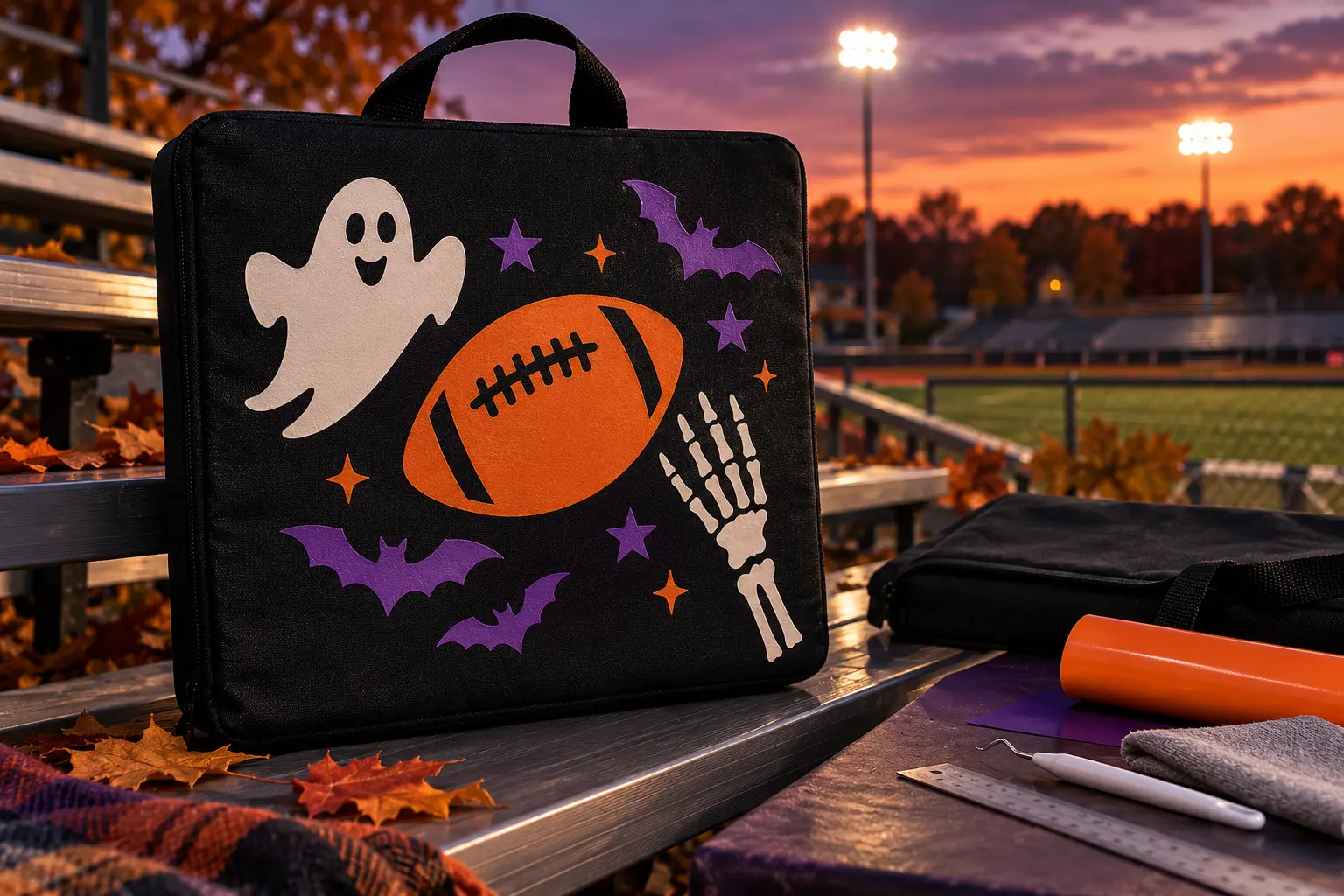
Cold metal bleachers are more comfortable with a compact cushion, and a removable cover is easier to decorate, clean, and store than an assembled foam pad. This project begins with a commercially sewn, heat-compatible cotton-canvas stadium-cushion cover that already has a zipper and reinforced carry handle. One broad football motif anchors the flat front, while a ghost, bats, stars, or skeleton detail add the Halloween layer. The insert stays completely out of the heat workflow: decorate the empty cover, let it cool and cure, and only then install the foam pad.
This is an original project plan based on ordinary home-cutter and heat-transfer-vinyl methods. Cover fiber content, dyes, coatings, padding, seam construction, zipper material, heat tool, platen, pressure, HTV formula, blade, mat, artwork detail, and local venue rules can all change the result. Follow the current instructions for the exact blank and vinyl, make a same-material test, and keep a pressing tool away from foam, hardware, straps, seams, and unknown coatings. The KleanKutChaos listing supplies digital decorative artwork only. The featured KleanKutChaos file is the design source for this tutorial, and this tutorial does not claim that the pictured combination was physically tested with the listing files.
What you’ll need
- Spooky Football SVG Bundle from the featured KleanKutChaos listing
- One commercially sewn removable stadium-seat-cushion cover in black cotton canvas or another fabric specifically approved for the selected HTV and heat method
- A correctly sized foam cushion insert that can be completely removed before pressing; do not cut unknown upholstery foam with a craft laser or heat it with a press
- Heat-transfer vinyl in two or three team-neutral Halloween colors, such as orange, cream, white, or purple, all from compatible product lines with known press instructions
- Cricut, Silhouette, or similar cutting machine with current software, a clean fine-point blade, and a mat approved for the selected HTV
- Household iron, EasyPress-style tool, or heat press approved by both the HTV and blank makers, plus its heat-safe base or stand
- Firm heat-resistant pressing pad or board sized to fit inside the empty cover while isolating the back panel
- Parchment, protective sheet, or pressing cloth only when the HTV maker calls for one; do not substitute a towel for a firm pressing surface
- Lint roller, ruler, fabric-safe marking pencil or low-tack placement tape, heat-resistant tape if permitted, and a paper placement template
- Weeding hook or tweezers, small scissors, brayer, and scraper
- Copy paper and scrap HTV for a size and material test
- Washable fabric scrap matching the cover as closely as possible for the heat test
- Safety glasses and any protective equipment required by the cutter, heat tool, blank, and vinyl makers
How to make it
- 1
Confirm the cover is truly removable
Unzip the cushion and take out every piece of foam, batting, rigid board, and loose insert. Inspect the empty shell for hidden padding, plastic backing, waterproof coating, rubberized dots, metal reinforcement, or bonded layers. Use another blank if the cover cannot lie completely flat or the maker does not permit the heat required by your HTV.
- 2
Check the venue before designing
Read the current bag, seat-cushion, handle, size, and prohibited-item rules for the exact stadium or event. Some venues restrict cushions with pockets, zippers, rigid backs, straps, or concealed compartments. Build for the rule you can verify, and keep the decoration team-neutral unless you have permission to use protected marks.
- 3
Measure the safe pressing box
Lay the empty cover flat and measure the uninterrupted front panel. Mark a safety box at least one inch inside the zipper tape, piping, handle stitches, seams, folds, and outer edge—or farther if the blank or heat-tool maker requires it. Measure the actual heat-tool footprint so it can sit level inside that box without rocking.
- 4
Prototype the layout in paper
Print or cut paper silhouettes of the football focal and two or three supporting motifs. Arrange them inside the safe box while the cover is empty. Sit the paper mockup against a chair or bleacher-height surface, then simplify or enlarge details that disappear from normal viewing distance.
- 5
Choose cuttable artwork
Open a duplicate working copy of the purchased design and keep the original unchanged. Select broad football, ghost, bat, star, or skeleton shapes with clear negative spaces. At final size, remove only isolated details that would become smaller than the vinyl maker recommends; do not distort the design or add a sports team logo.
- 6
Plan the color and press order
Limit the design to two or three compatible HTV colors. In the cutter software, separate the colors and decide whether they touch, nest, or overlap according to the vinyl maker's layering rules. Put the largest, least heat-sensitive layer first and avoid stacking vinyl over the entire football because thick layers can feel stiff on a seat cover.
- 7
Test the cover and vinyl together
Press a small scrap of the same or closely matching fabric with a scrap of every HTV color using the exact current temperature, time, pressure, and peel instruction. Reject any combination that scorches, shrinks, discolors, wrinkles, releases dye, leaves a shiny platen mark, or fails a gentle edge check after cooling.
- 8
Mirror and cut each HTV mat
Mirror every heat-transfer layer before cutting unless the exact material instructions say otherwise. Place HTV on the mat in the orientation specified by its maker, run a small test cut, and confirm the blade cuts the vinyl but not through the carrier before sending the final mats.
- 9
Weed and label the layers
Remove the surrounding vinyl and interior cutouts while leaving the design on its carrier. Keep the carrier clean and flat. Mark the back of each carrier with its order using a removable note rather than writing where ink could transfer under heat, then stack the layers away from the hot-tool area.
- 10
Prepare an alignment map
Trace the cushion-cover outline and safe box on copy paper. Mark horizontal and vertical centerlines, then place each weeded carrier on the map and note its distance from the top and side. Use the map to prevent small bats or stars from drifting into zipper, seam, or handle zones.
- 11
Isolate the front panel
Lint-roll the empty cover and slide the firm pressing pad inside so the front panel is supported but the back panel, zipper pull, piping, handle, and seams hang completely beyond the heat-tool footprint. Smooth the fabric without stretching it. Preheat only when both the HTV and blank makers instruct it.
- 12
Place the first layer
Use the paper map and centerlines to position the largest carrier shiny side up. Verify the whole heat-tool footprint remains level on the flat fabric. If permitted, secure only the carrier edge with heat-resistant tape; ordinary tape, zipper teeth, foam, piping, straps, and loose hardware must stay away from the heated area.
- 13
Press exactly as specified
Apply the heat tool with the current temperature, time, pressure, motion, and protective layer specified for the exact HTV and fabric. Keep the tool level and move it to its heat-safe stand immediately afterward. Do not add time or pressure to compensate for a seam, and never press the cushion with its foam insert installed.
- 14
Peel at the correct temperature
Let the carrier reach the maker's stated hot-, warm-, or cold-peel condition. Pull it slowly at a low angle while watching the smallest edges. If a section lifts, replace the carrier and use only the maker-approved repress method; do not improvise with a higher temperature.
- 15
Add the remaining colors
Align the next carrier using the paper map. Cover previously exposed vinyl only as its maker directs, then use the shortest approved layering press so earlier sections do not receive unnecessary heat. Repeat for the final small accents and complete any prescribed finishing press without crossing seams or hardware.
- 16
Cool, inspect, and cure
Leave the empty cover flat until it is fully cool. Check every edge under good light, flex the fabric gently, and make sure the zipper, handle stitching, and seams were unaffected. Follow the vinyl maker's full cure interval before stretching, washing, loading the insert, or taking the cover outdoors.
- 17
Install and field-check the cushion
After curing, compress the approved foam insert just enough to slide it through the zipper without pulling on the decoration. Close the zipper fully and sit-test the cushion at floor level over a rug before using it on bleachers. Confirm the cover does not slide, the handle stitching stays flat, and the decoration does not fold under the seated area.
Practical finishing tips
- A single large football plus two small supporting motifs is easier to weed, align, and read from across a row than nineteen tiny icons.
- Use the same brand and product line for every layered HTV color unless the makers explicitly confirm compatibility.
- Photograph the paper layout with a ruler in frame before moving it; the image is a useful placement record at the pressing table.
- Choose a cushion cover with a factory-sewn reinforced handle instead of adding a handle to a finished blank with glue or heat-applied patches.
- Store the clean, dry cushion uncompressed so the foam and decoration do not develop permanent creases.
- Carry a small plastic seat cover for damp bleachers rather than treating ordinary HTV or cotton canvas as waterproof.
Troubleshooting
Stop before heating. Reposition the internal pressing pad so the zipper, seams, piping, and handle are outside the platen. If the flat zone is still smaller than the heat tool, choose a smaller approved tool or a different blank; uneven pressure is not fixed by pushing harder.
Return the carrier, protect the design as directed, and use only the maker's approved repress time and pressure. If the fabric is coated or the heat test failed, remove the failed layer if possible and choose a compatible blank rather than escalating temperature.
The heat, pressure, protective sheet, or platen contact may be unsuitable for the finish. Let the cover cool completely and do not repeatedly repress the mark. For the next blank, use the successful scrap-test settings or select a fabric that tolerates the required heat.
Reduce overlap by slicing the layout into adjacent color regions or use one-color silhouettes. Do not stack full-size vinyl shapes simply to make alignment easier; each extra layer changes the hand of the fabric.
Remove it and check the insert size against the cover measurements. Compress the foam evenly and keep it away from the zipper slider. Never force the pull or trim foam with the cover installed; use a correctly sized replacement insert if needed.
Stop using it in that location. A decorative cotton cover is not a restraint or anti-slip safety device. Follow the venue's seating rules and choose a manufacturer-rated non-slip cushion rather than adding untested coatings, straps, or hardware.
Ways to make it yours
Cut a broad ghost-and-football silhouette in white or orange HTV, skipping layered alignment while preserving the same safe pressing box.
Scale the arrangement for a removable cotton floor-cushion cover and keep the artwork on an upright side panel rather than the main sitting surface.
Use small bats and footballs on heat-compatible zip pouches for clean towels, hand warmers, or ear protection; never label first-aid or safety gear in a way that hides instructions.
Cut matching motifs from cardstock for a reusable indoor photo banner when the chosen cushion fabric cannot safely accept heat.
Keep crafting
- DIY Trunk-or-Treat Car Magnet Kit With Cricut Print Then Cut — Make a reusable set of colorful trunk-or-treat car magnets with rounded shapes, a numbered placement map, and a rigid storage portfolio.
- DIY Witchy Halloween Candy Bowl Pedestal With Cricut Vinyl — Build a stable witchy candy-bowl display with a vinyl-decorated backboard, a washable removable bowl, and a traffic-safe layout for Halloween visitors.
- DIY Haunted Circus Halloween Ring-Toss Game With Cricut Vinyl — Turn a stable wooden ring-toss set into a haunted-circus party game with layered permanent-vinyl carousel, big-top, moon, star, and ticket motifs.
Inspiration & further reading
This is an original Klean Kut Halloween Crafts project inspired by approachable techniques shared across trusted craft and home sources. Explore Cricut: Everyday Iron-On Instructions, Cricut Heat Guide and U.S. Consumer Product Safety Commission Art and Craft Safety Guide for more ideas and technique background.